# What's New? 🎈

#### 29 August 2024 <a href="#new-features-1" id="new-features-1"></a>

## Release Summary

The release focused on adding the following new features and enhancements:

* Support for data localization for new numbers
* Parity between cloud and on-prem features

Each of these items is described in more detail below.

## Release Details

### Data Localization

Cloud API Local Storage allows clients to control where their message data is stored at rest. If a company is in a regulated industry such as finance, government, or healthcare, they may prefer to have message data stored in a specific country when at rest, due to these regulatory requirements or company policies.&#x20;

Clickatell now supports data localization, which means:&#x20;

* With any **new** WhatsApp number that a client registers, they can select the country where their data at rest should be hosted. This is specified per number.
* Clients have the following options to select from:
  * **APAC**: India, Singapore, Indonesia, South Korea, Japan, Australia
  * **LATAM**: Brazil
  * **MEA**: South Africa, Bahrain, UAE
  * **Europe**: EU (Germany), UK, Switzerland
  * **NORAM**: Canada, USA
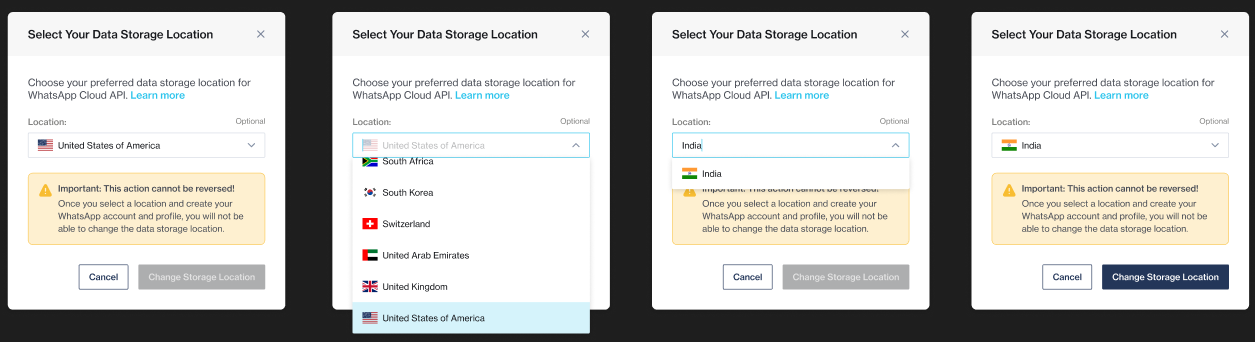
* Once selected, clients cannot change the locale again.
* All **existing** numbers are set to the default, i.e., USA.

{% hint style="info" %}
For more information, please reference [this page](https://developers.facebook.com/docs/whatsapp/cloud-api/overview/local-storage/) by Meta.&#x20;
{% endhint %}

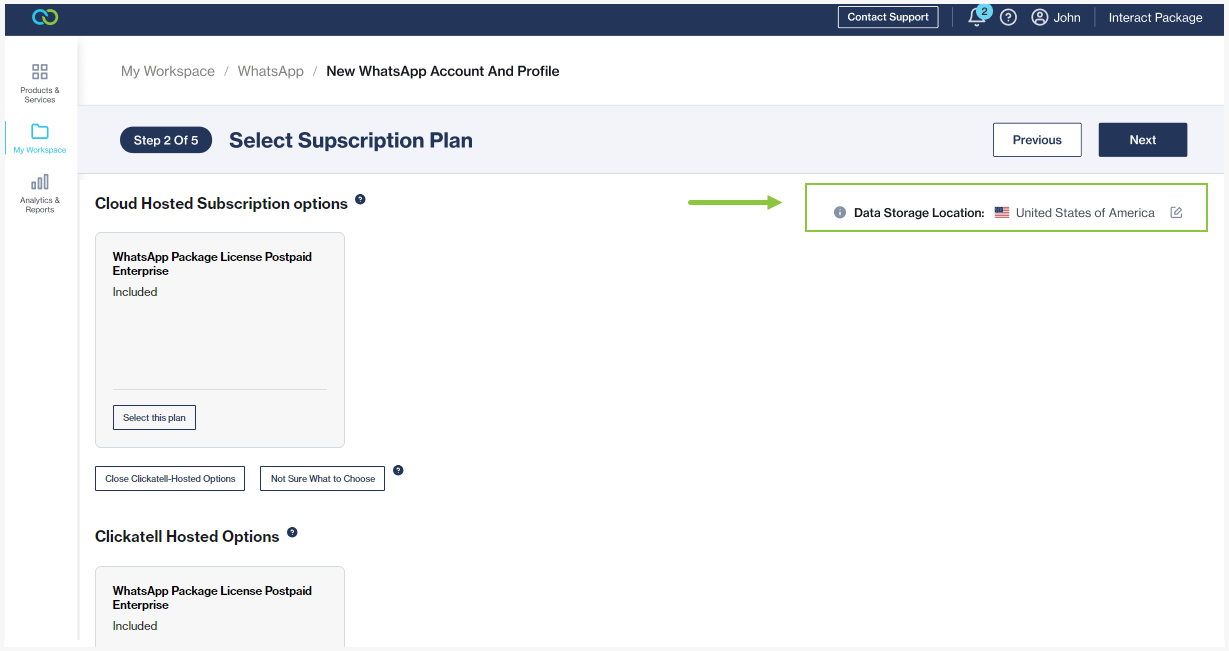
<figure><img src="/files/nfeLQAO8qoElW0pUlmWx" alt=""><figcaption><p>When setting up a new WhatsApp number you have the option to edit the location and choose from the provided locations.</p></figcaption></figure>

<figure><img src="/files/g98fu9cDJqhpgQ3PDJ7r" alt=""><figcaption><p>Clicking on the edit button, you can select the data storage location from a drop-down. Once changed and saved, we do not allow clients to edit this again at a later stage.</p></figcaption></figure>

### WhatsApp: Cloud vs On-Prem Parity

The following features are now supported for cloud-hosted WhatsApp numbers. Previously these were only supported for on-prem WhatsApp numbers.

* **Location request messages:** These messages request your end-user's location. They contain body text and a *Send location* button that opens a location-sharing screen when tapped so end-users can share their location. *Read more* [*here*](/whatsapp/channel-capabilities/interactive-messages-lists-reply-buttons-location-requests.md#how-to-set-up-interactive-messages-1)*.*
* **Coupon code templates:** These marketing templates display a single copy code button. When tapped, the code is copied to the end-user's clipboard. *Read more* [*here*](/whatsapp/channel-capabilities/whatsapp-message-templates/use-interactive-buttons-in-message-templates.md#copy-offer-code)*.*
* **Catalog templates:** These marketing templates allow you to showcase your product catalog entirely within WhatsApp. *Read more* [*here*](/whatsapp/channel-capabilities/whatsapp-message-templates/showcase-product-catalog-in-message-template.md)*.*&#x20;
* **Single-Product Messages**: Messages with a single product item from the business's inventory. (Available via One API only). *Read more* [*here*](https://developers.facebook.com/docs/whatsapp/guides/commerce-guides/share-products-with-customers#product-messages). &#x20;
* **Multi-Product Messages**: Messages with up to 30 product items from the business's inventory. *Read more* [*here*](https://developers.facebook.com/docs/whatsapp/guides/commerce-guides/share-products-with-customers#product-messages).


---

# Agent Instructions: Querying This Documentation

If you need additional information that is not directly available in this page, you can query the documentation dynamically by asking a question.

Perform an HTTP GET request on the current page URL with the `ask` query parameter:

```
GET https://help.clickatell.com/whatsapp/help-and-information/whats-new.md?ask=<question>
```

The question should be specific, self-contained, and written in natural language.
The response will contain a direct answer to the question and relevant excerpts and sources from the documentation.

Use this mechanism when the answer is not explicitly present in the current page, you need clarification or additional context, or you want to retrieve related documentation sections.