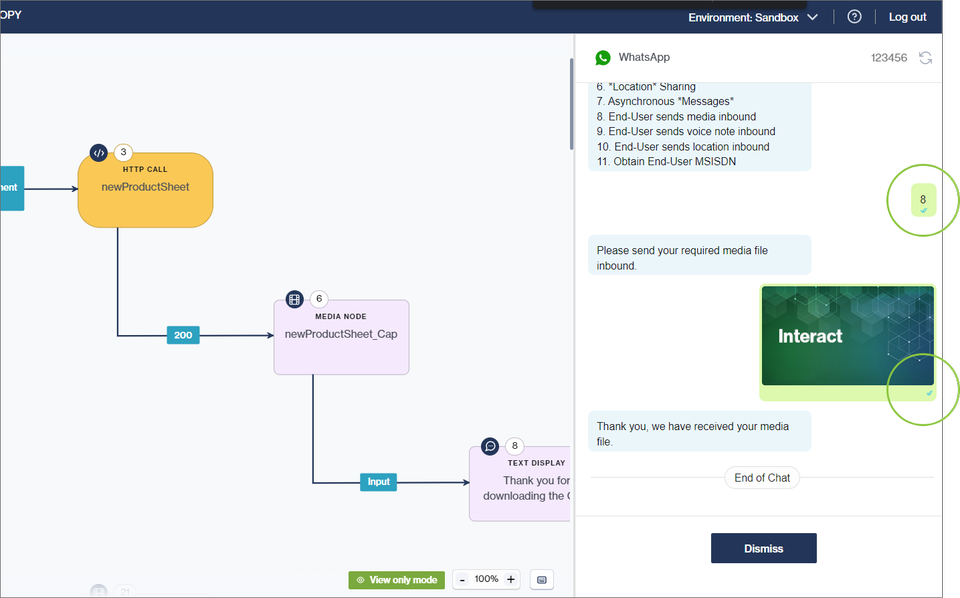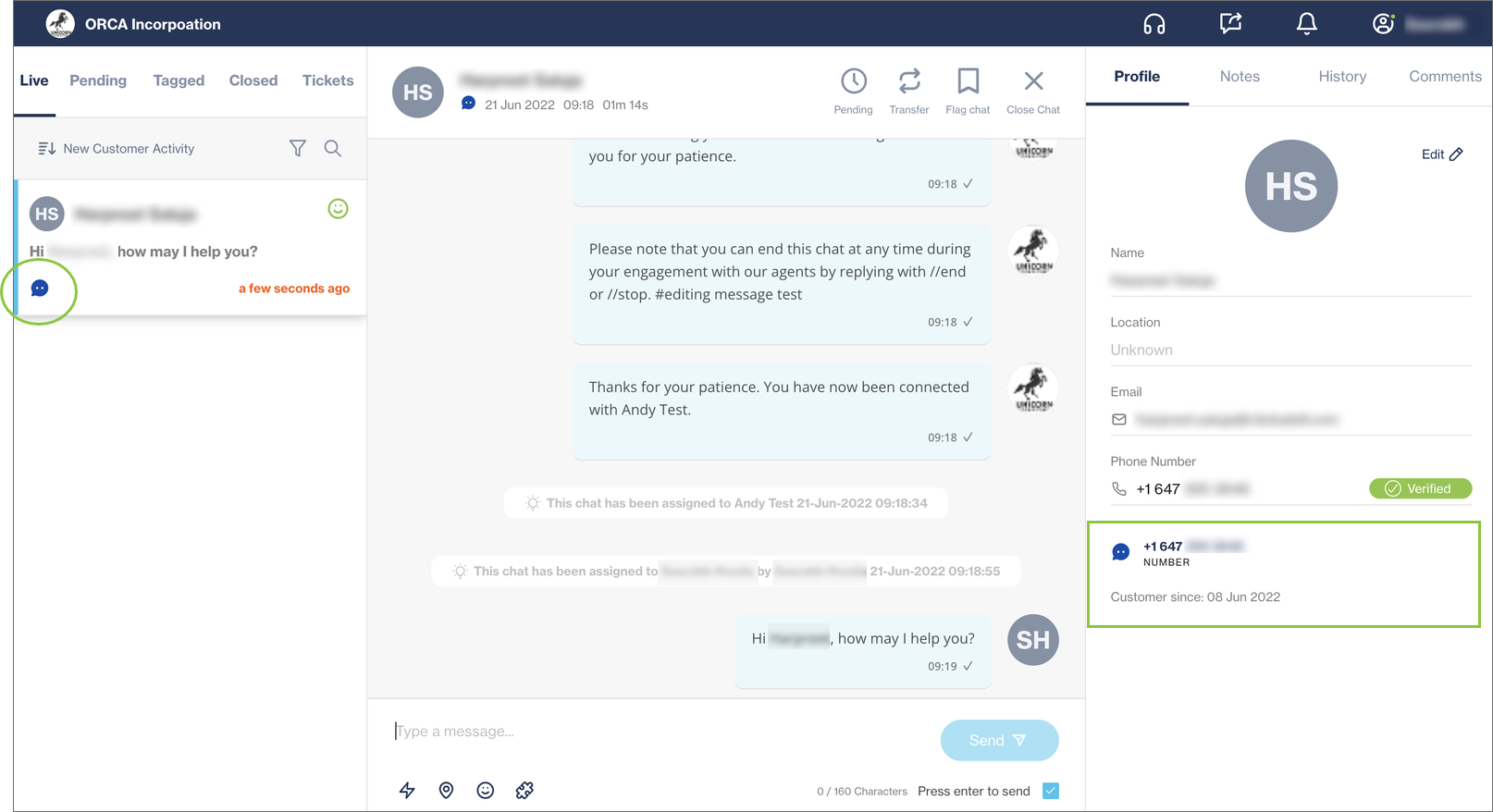
# Release notes

## Ticketing Enhancements

Release date: 8 December 2022

Several enhancements were made to the way ticketing works in [Chat Desk](https://clickatell.gitbook.io/chat-desk/overview/overview) to improve the performance of the tool itself, but also to assist Agents and Supervisors to better manage and respond to tickets. The following changes were made:

* **Removal of automatic ticket assignments** - All tickets must now be manually assigned to agents by a Supervisor.
* **Unassigned tickets queue** - Agents can now view a list of all unassigned tickets, with the most recent at the top, and assign tickets to themselves from this list.
* **Assigned tickets queue** - Agents can view and respond to all the tickets assigned to them from the *Assigned* queue. Agents can only view the tickets assigned to them, and there is no limit to the number of tickets that can be assigned to an agent.
* **Tickets no longer expire,** they are just archived after 90 days.
* **Closing tickets** - Agents can now close any assigned tickets. Supervisors can close any assigned or unassigned tickets.
* **Quick accept** - Agents can use the new "*Quick accept*" buttons to quickly accept 3, 5, or 10 tickets (or a custom number), with the oldest tickets assigned first.
* **Outside of business hours** - When a ticket is created outside of office hours, an autoresponder (configurable) is sent to inform the user that they can leave multiple messages for an agent in the ticket. This new auto-responder message is sent after the existing out-of-support hours autoresponder.
* **User-initiated chat session after ticket creation -** When a user with an open ticket initiates a new chat with an agent, the user’s existing ticket is closed automatically. When a user with an open ticket tries to reach an agent but is again unable to initiate a chat, the new chat message is merged with the existing ticket when it is time to convert that chat to a ticket.
* **Other changes**
  * The "*All Tickets"* queue was removed from the Supervisor Desk.
  * Agents are now notified when a supervisor assigns a new ticket to them via an in-app notification.
  * Agents can no longer transfer tickets to other agents. This can now only be done by supervisors.
  * Supervisors can reassign (i.e., transfer) assigned tickets to other agents via the "*Reassign"* button.
  * "*Filter by Sentiments*" is no longer available in the *Closed* tickets section of the Agent Desk.
  * Tickets can now only be sorted by the *Created Date, Ticket Assigned,* or *Closed Date* timestamps.<br>

## Authentication Extension in Chat Desk

Release date: 8 December 2022

The [Embedded Client Authentication](https://clickatell.gitbook.io/embedded-client-authentication-user-guide/configuration/configure-and-update-an-identity-provider-idp) feature is now also supported on Chat Desk. Previously, this feature was only available on [Chat Flow](https://clickatell.gitbook.io/flow/user-facing-nodes/input-nodes/oauth-request). Client authentication using OAuth 2.0 allows agents in Chat Desk to authenticate their customers before they perform certain operations to protect them from fraudulent activities.

For more information on how to use this feature in Chat Desk, see [here](https://clickatell.gitbook.io/chat-desk/agent-chat-desk/authenticate-customers).

<figure><img src="https://2380245535-files.gitbook.io/~/files/v0/b/gitbook-x-prod.appspot.com/o/spaces%2Fl8ao2e7ogQyZBti1BuxA%2Fuploads%2F4n008rvXeqsqLTeD5siI%2Fimage.png?alt=media&#x26;token=ab90848f-cf92-4430-8906-6c7560a686d3" alt=""><figcaption></figcaption></figure>

## Previewer enhancements & HTTP Call node name change

Release date: 7 December 2022

#### Release Summary

This release focused on enhancing the flow [Previewer ](https://clickatell.gitbook.io/flow/workflow-management/using-the-previewer)(a.k.a. the emulator) to provide flow-builders with a powerful tool to view and test their flows and get a real feel for their end-users' experience. We've also updated the name of our *HTTP Call* node to be the more descriptive [*API Integration* node](https://clickatell.gitbook.io/flow/action-nodes/action-nodes-api-integration).

#### Node name change

We renamed the *HTTP Call* node to [*API Integration*](https://clickatell.gitbook.io/flow/action-nodes/action-nodes-api-integration) so that the name is more descriptive and accurate to the node's function, and so it better aligns with the existing "[*API Integration*](https://clickatell.gitbook.io/flow/configuration/api-integration)" section.

#### Emulator (previewer) enhancements

**Test your current flow without a route**

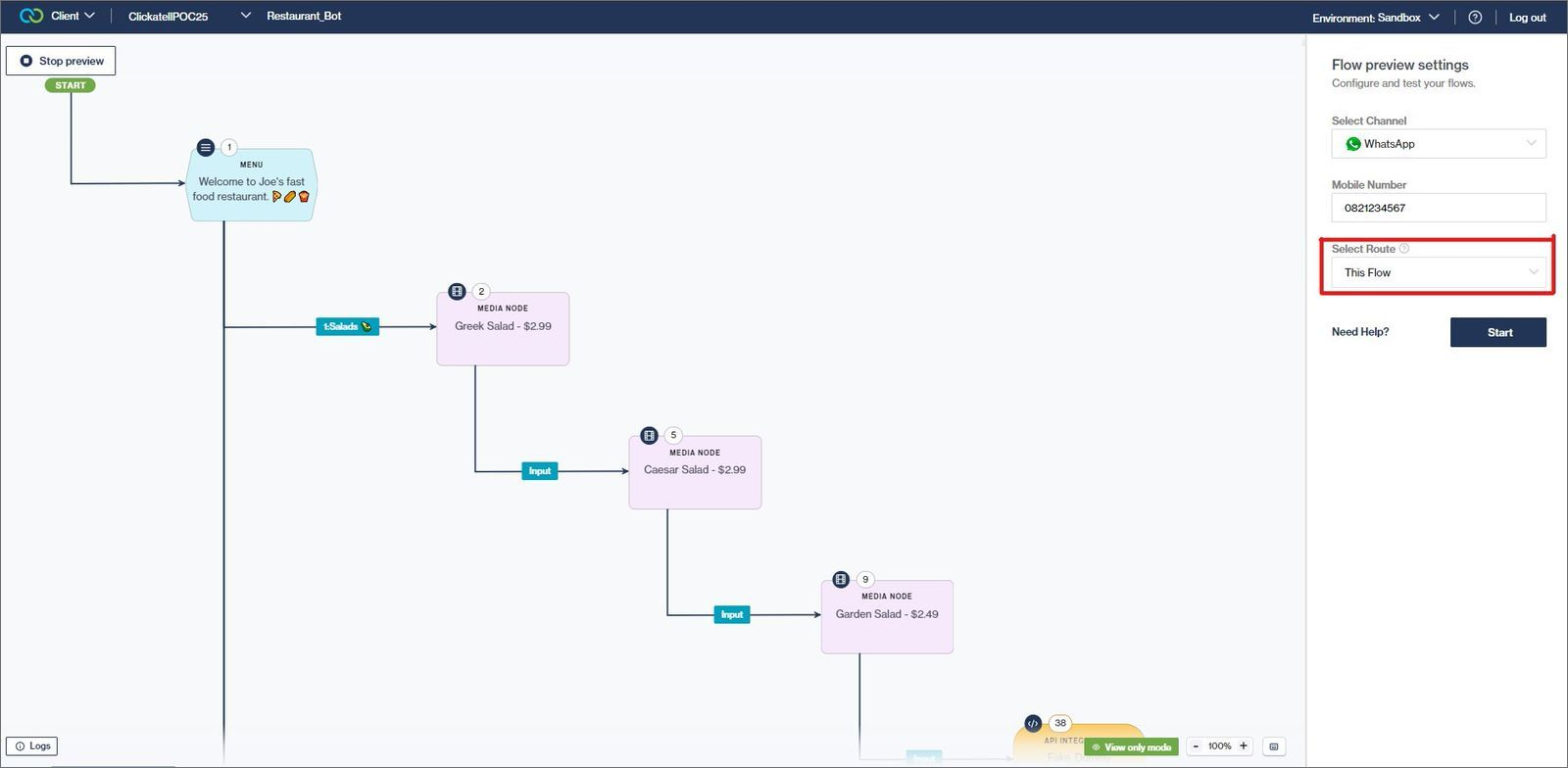
Previously, as a flow-builder, you first had to configure a route in the Routing section before you could preview your current workflow on the emulator. We've removed this unnecessary step and now allow you, once you've saved the flow, to preview it in the emulator immediately, without having to set up a route first. This makes it quicker and easier to test the flow you are currently working on.

Once you click *Preview*, the selected route in the emulator defaults to "*This Flow*". You can simply add a mobile number and click "*Start*". You can also select another route from the drop-down if you want to test something else. This changes the flow structure visible on the canvas so that the emulator and canvas are always in sync.

<figure><img src="https://2380245535-files.gitbook.io/~/files/v0/b/gitbook-x-prod.appspot.com/o/spaces%2Fl8ao2e7ogQyZBti1BuxA%2Fuploads%2FfVAGinON33MHykyobsYB%2Fimage.png?alt=media&#x26;token=40f1d29e-a583-497e-84e5-dee2d5f698d3" alt=""><figcaption></figcaption></figure>

**Focus on the current node and highlight the execution path**

Previously, the workflow that you were testing and the emulator you were testing on, were completely separate. This meant that, when you spotted something on the emulator that you wanted to edit or fix in the workflow, you had to scroll through the whole flow in search of the particular step or node you wanted to adjust.

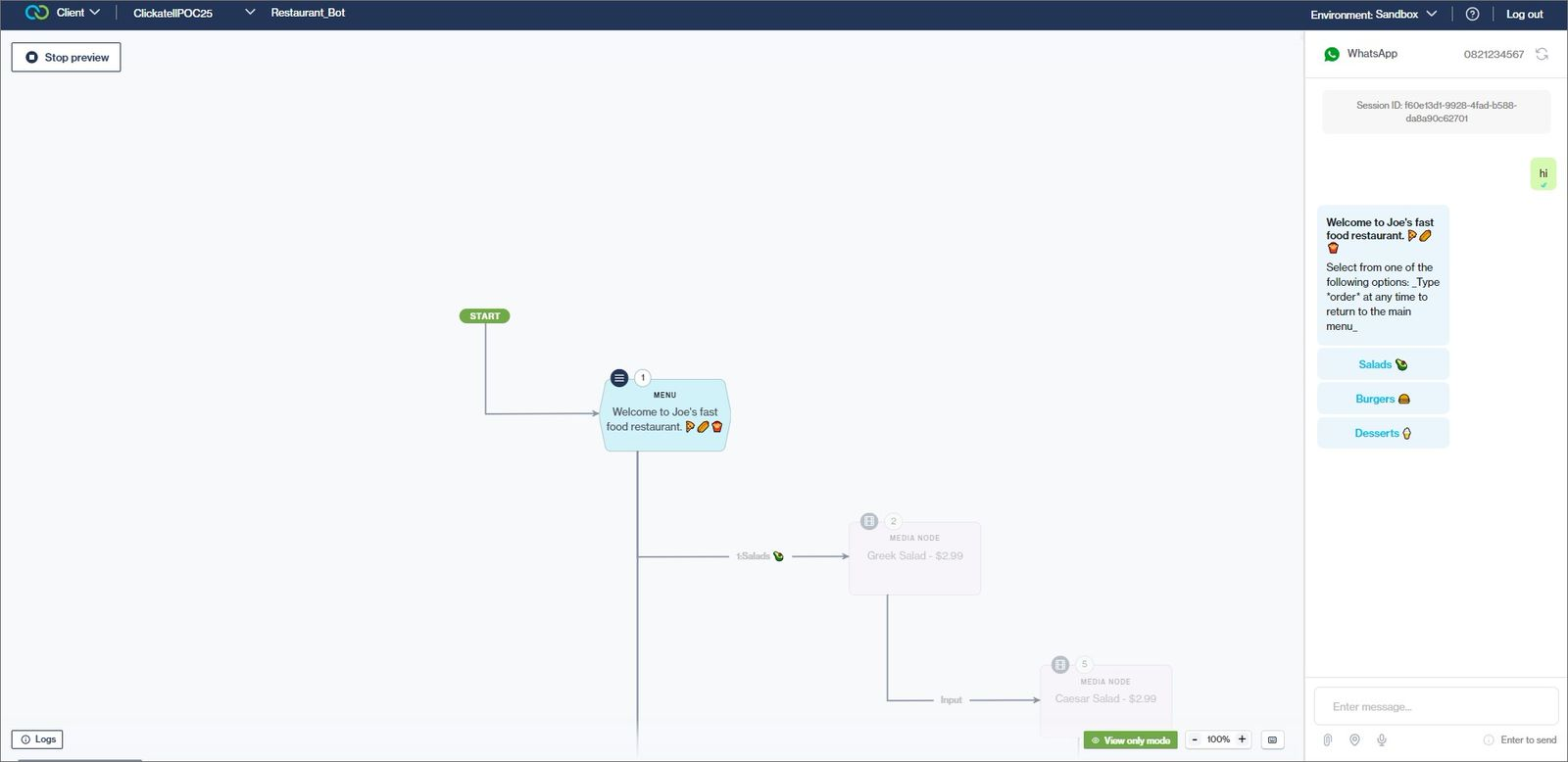
With this release, we've made the canvas more 'dynamic' so that what you see on the canvas and what you see on the emulator are more in sync.

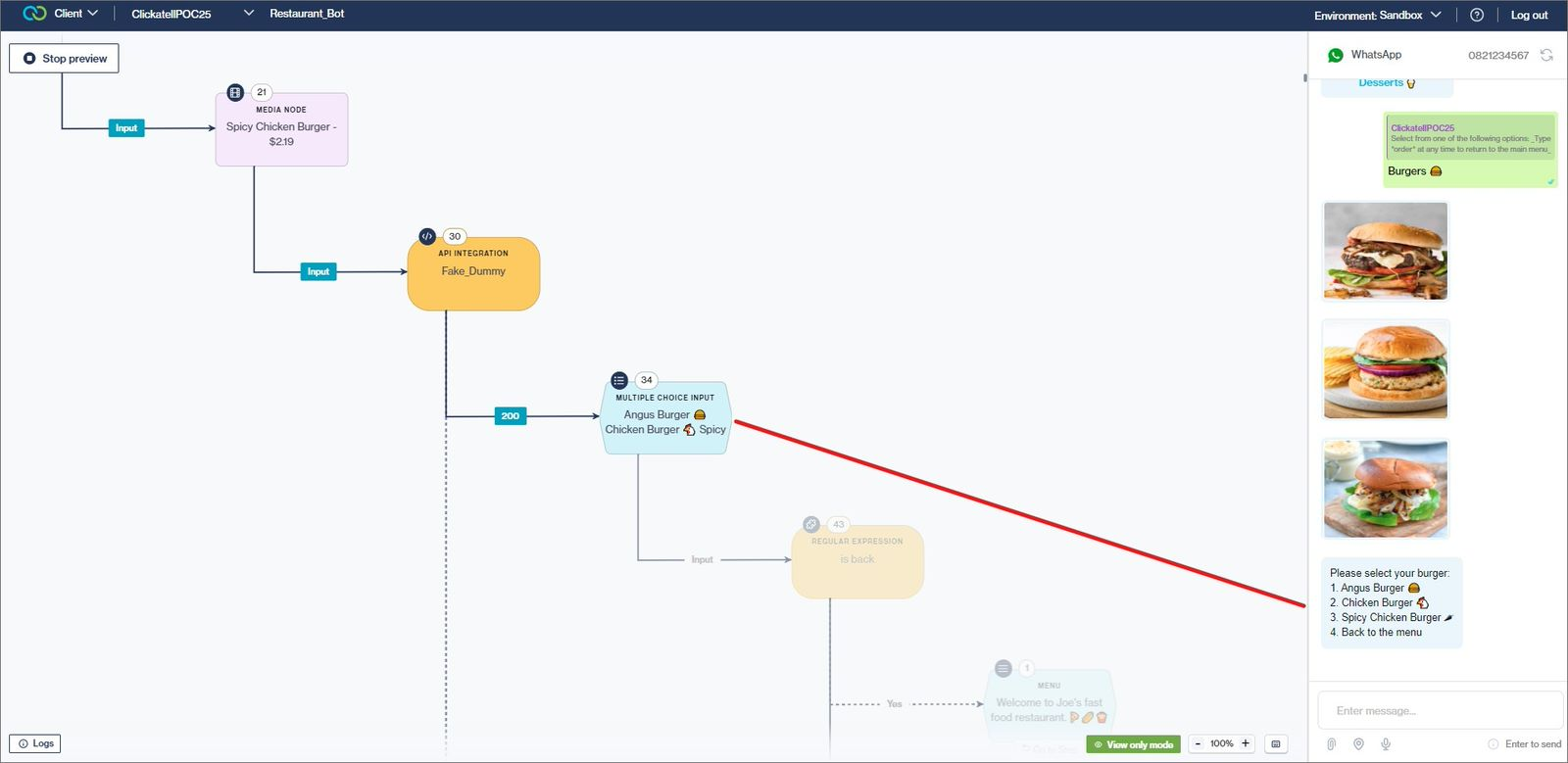
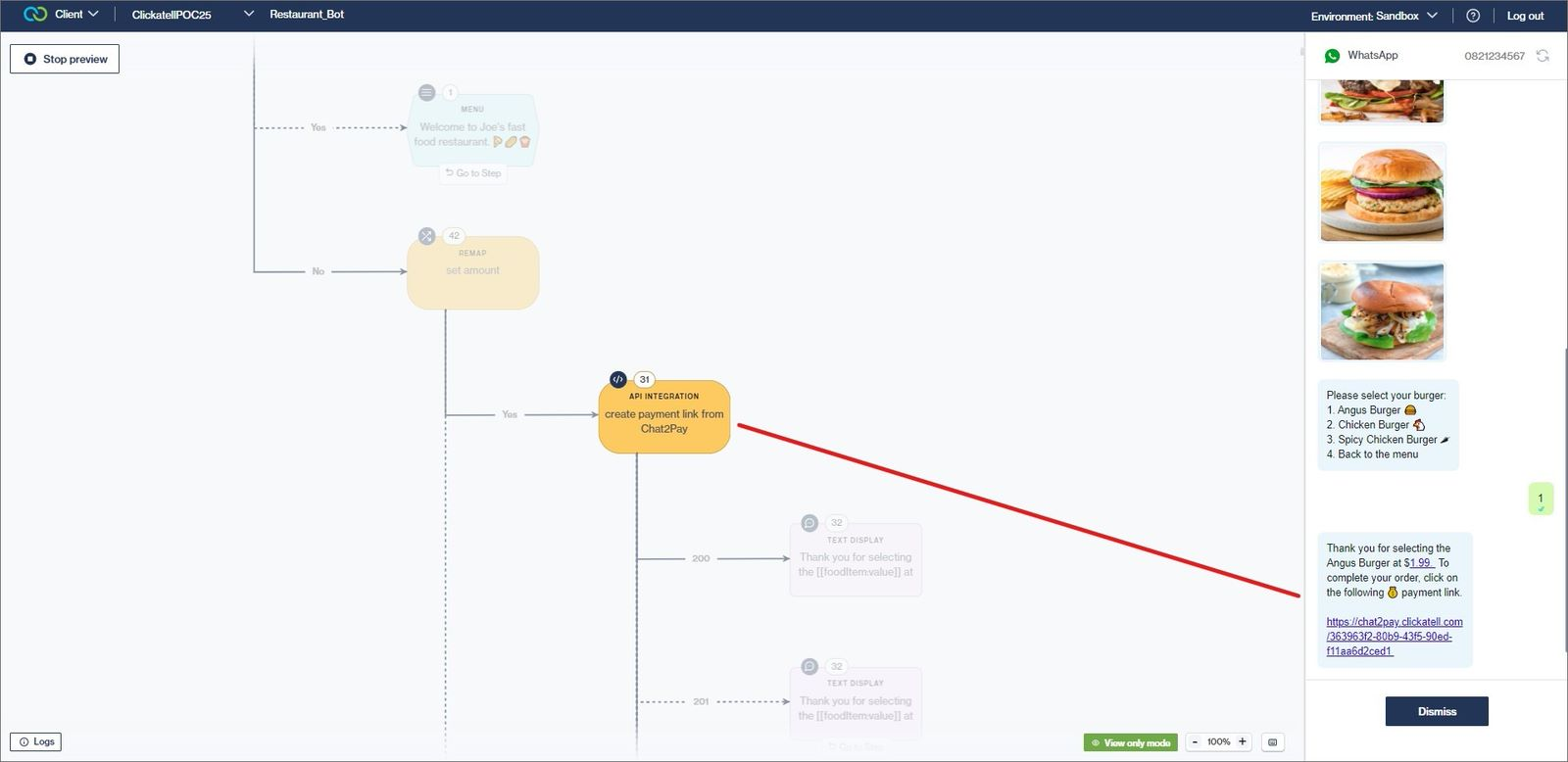
As you move through the flow's steps on the emulator, the flow structure on the canvas moves with it, keeping the current step in focus at the center of the canvas. The path taken based on the end-user's input and menu option selections will be highlighted with the untaken path slightly greyed out.

This helps you with visual indicators to understand the flow behavior better and to troubleshoot and fix your flows easier.​​​​​​​

<figure><img src="https://2380245535-files.gitbook.io/~/files/v0/b/gitbook-x-prod.appspot.com/o/spaces%2Fl8ao2e7ogQyZBti1BuxA%2Fuploads%2Fo7gfgsJnsXPtrBttGNZu%2Fimage.png?alt=media&#x26;token=0ea31f2d-db80-44e1-91af-ce01851ee483" alt=""><figcaption></figcaption></figure>

<figure><img src="https://2380245535-files.gitbook.io/~/files/v0/b/gitbook-x-prod.appspot.com/o/spaces%2Fl8ao2e7ogQyZBti1BuxA%2Fuploads%2FZZt7ilDqGhK3gdzvOHfr%2Fimage.png?alt=media&#x26;token=494d3da3-fe8c-4b91-9e31-b08887bb399c" alt=""><figcaption></figcaption></figure>

<figure><img src="https://2380245535-files.gitbook.io/~/files/v0/b/gitbook-x-prod.appspot.com/o/spaces%2Fl8ao2e7ogQyZBti1BuxA%2Fuploads%2F3w6zxesFXYyVvMjtcSZV%2Fimage.png?alt=media&#x26;token=7d8375ac-a79f-48b9-9433-c28c750b6b82" alt=""><figcaption></figcaption></figure>

**Execution Logs**

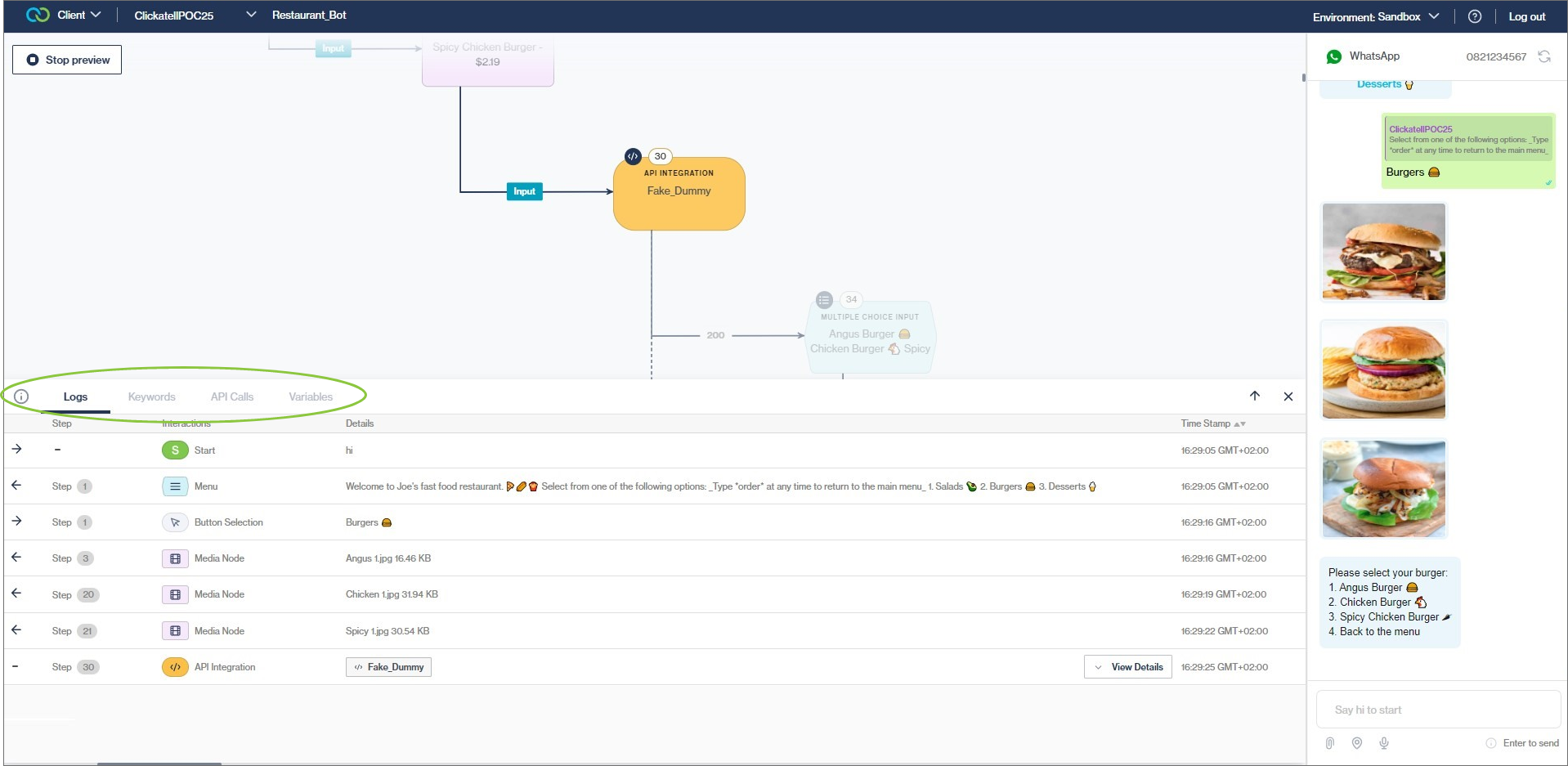
The *Execution Logs* assist you to gather insight about and troubleshoot your flows.

When previewing your flow on the emulator, you can select the 'Logs' button in the bottom left of the canvas. This opens a panel with detailed information about how the flow was executed in this session.

The following tabs are available:

* **Logs -** Displays every step, action, input, output, and action that was executed.
* **Keywords -** Shows all keywords that were used during the session, including their destination.
* **API Calls -** Indicates all the API calls made during the session. You can deep-dive into the API call details, viewing the API Request, API Response, and the variables within the API payload.
* **Variables -** Presents you with all the variables that are available to use in the session, and what was entered by the end-user as inputs.

<figure><img src="https://2380245535-files.gitbook.io/~/files/v0/b/gitbook-x-prod.appspot.com/o/spaces%2Fl8ao2e7ogQyZBti1BuxA%2Fuploads%2FSjOXp9tGfAymS987W4lS%2Fimage.png?alt=media&#x26;token=4efc96cc-20b7-48a9-87cc-e0263c9976bb" alt=""><figcaption></figcaption></figure>

## SMS Long Number Management & WhatsApp pre-approved templates

Release date: 9 November 2022

### SMS Long Number Management <a href="#sms-long-number-management" id="sms-long-number-management"></a>

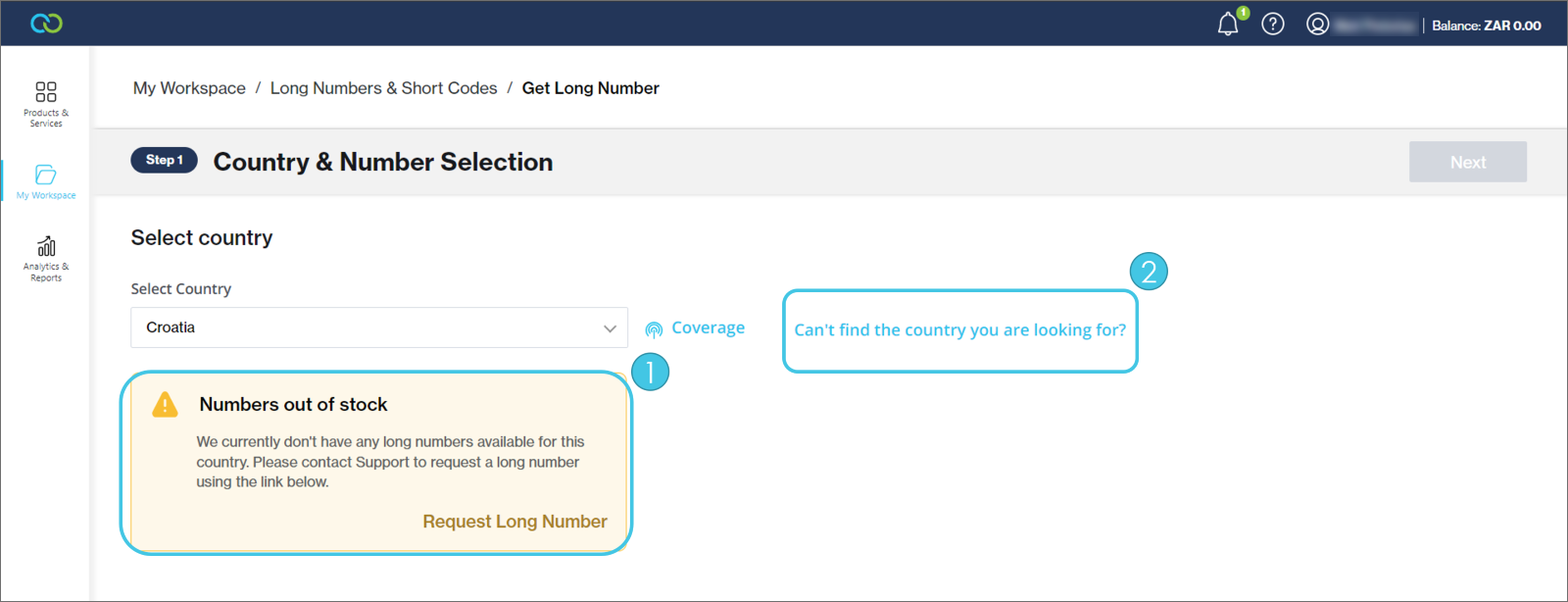
We noticed that our stock of [SMS Long Numbers](https://clickatell.gitbook.io/sms-user-guide/long-numbers) sometimes runs out as a result of large orders or other edge cases. To improve your experience, we've added two new features:

1. Request form when long numbers are out of stock
2. Request form when long numbers are not available for a country

Once submitted, our teams get notified and will be in touch to assist you with your request.

<figure><img src="https://2380245535-files.gitbook.io/~/files/v0/b/gitbook-x-prod.appspot.com/o/spaces%2Fl8ao2e7ogQyZBti1BuxA%2Fuploads%2FvHc5al4t9DwnoOiHmqsK%2Fimage.png?alt=media&#x26;token=6988ce86-10a0-46e1-8253-895f3bc5fd7e" alt=""><figcaption></figcaption></figure>

### WhatsApp Pre-Approved Templates Improvements

You can now [test ](https://clickatell.gitbook.io/whatsapp-user-guide/getting-started/test-your-integration)the full range of pre-approved templates offered, including media and button templates that require variables.

<figure><img src="https://2380245535-files.gitbook.io/~/files/v0/b/gitbook-x-prod.appspot.com/o/spaces%2Fl8ao2e7ogQyZBti1BuxA%2Fuploads%2F6g5RdQh46s18RjeFJU5I%2Fimage.png?alt=media&#x26;token=04b4dfca-79aa-40f7-82c3-4c43d0febf1f" alt=""><figcaption></figcaption></figure>

## Other Enhancements & Improvements

## Onboarding & subscription renewal enhancements

Release date: 9 November 2022

### Easier onboarding for Chat Flow and Chat Desk <a href="#chat-flow-and-chat-desk-provisioning" id="chat-flow-and-chat-desk-provisioning"></a>

We have made significant simplifications to the way that [Chat Flow](https://clickatell.gitbook.io/flow/) and [Chat Desk](https://clickatell.gitbook.io/chat-desk/overview/overview) are activated and linked to channels. You can now easily set up these two products and their linked channels without needing assistance from our teams, allowing you to be more self-sufficient and less reliant on Clickatell to support you.

In upcoming releases, we will continue improving the provisioning of our various products to provide you with an improved onboarding experience throughout.

<figure><img src="https://2380245535-files.gitbook.io/~/files/v0/b/gitbook-x-prod.appspot.com/o/spaces%2Fl8ao2e7ogQyZBti1BuxA%2Fuploads%2FiLSVnbwdO9vMVR7NJRCY%2Fimage.png?alt=media&#x26;token=306184a4-7169-414b-9a65-64d79f7b7268" alt=""><figcaption></figcaption></figure>

### Multiple Subscription Renewal Feature

While we have an auto-renewal payment feature in the Portal, this is optional and some customers prefer to renew their subscriptions manually.

This new feature allows customers to renew multiple subscriptions with a single payment instead of having to complete each subscription renewal individually.

***Note:** This only applies to prepaid customers.*

## Standardize CSAT ratings & WhatsApp Read Receipts

Release date: 8 September 2022

### Standardize CSAT ratings

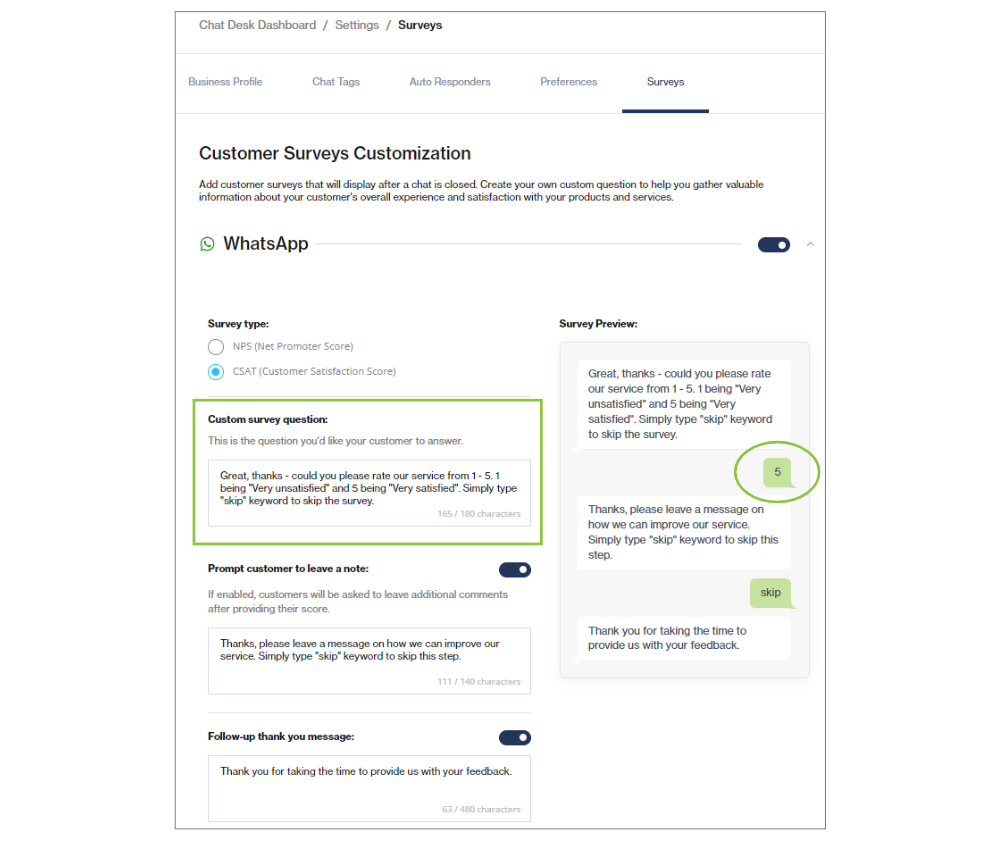
Before, Chat Desk had different rating scales for [CSAT surveys](https://clickatell.gitbook.io/chat-desk/chat-desk-dashboard/settings/survey-management) that our clients could select from. However, for simplicity and consistency of rating across our channels, Chat Desk now supports only one rating scale (1-5).

<figure><img src="https://2380245535-files.gitbook.io/~/files/v0/b/gitbook-x-prod.appspot.com/o/spaces%2Fl8ao2e7ogQyZBti1BuxA%2Fuploads%2FrhARN3mg6Z0uNgoCqCHo%2Fimage.png?alt=media&#x26;token=7954e3e1-25d0-4ba6-b6e2-d60f1bf5de49" alt=""><figcaption></figcaption></figure>

### WhatsApp Read Receipts

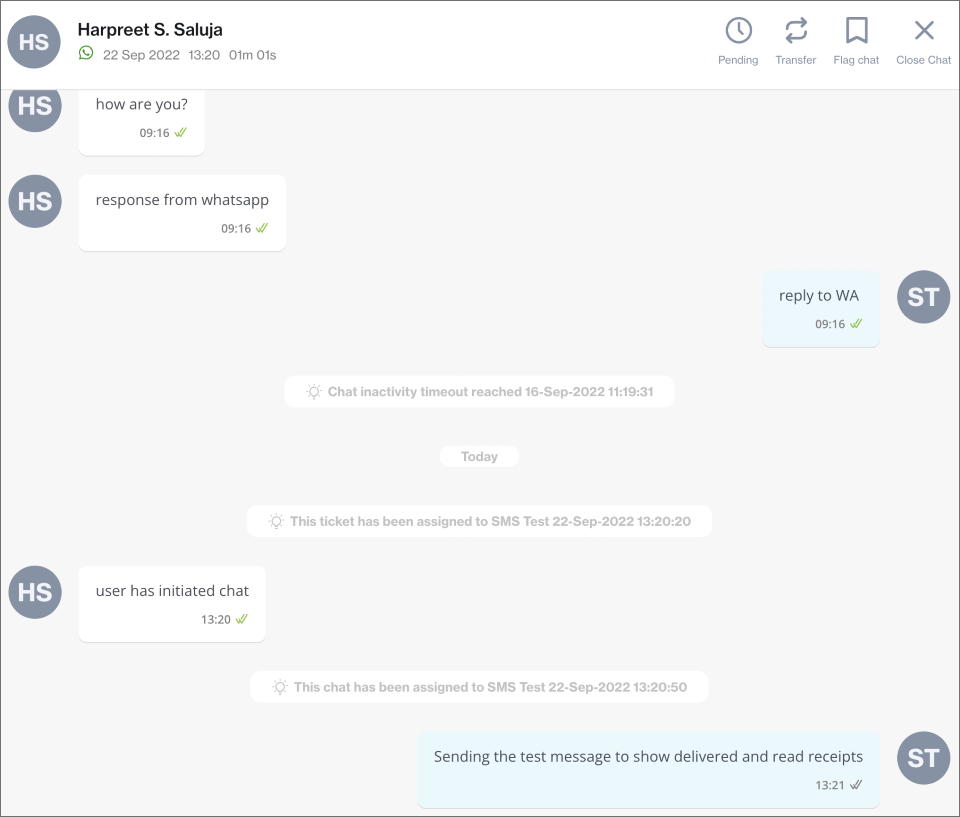
Chat Desk now supports read receipts for WhatsApp chats between agents and end-users, as long as the read receipts feature is enabled on the end-user's side. Agents and end-users can see whether their message has been delivered to (two grey ticks) or read by (two green ticks) the other party as shown below.

<figure><img src="https://2380245535-files.gitbook.io/~/files/v0/b/gitbook-x-prod.appspot.com/o/spaces%2Fl8ao2e7ogQyZBti1BuxA%2Fuploads%2FLHhuFUa3mGpG3yJ5RQSh%2Fimage.png?alt=media&#x26;token=82cee56f-bd20-4253-baf3-273df420c342" alt=""><figcaption><p>Two grey ticks signify that a message has been delivered.</p></figcaption></figure>

<figure><img src="https://2380245535-files.gitbook.io/~/files/v0/b/gitbook-x-prod.appspot.com/o/spaces%2Fl8ao2e7ogQyZBti1BuxA%2Fuploads%2FGuOtn1BtdQbkmQ906PrK%2Fimage.png?alt=media&#x26;token=ee15a10e-8d85-4e6f-a48d-613920668946" alt=""><figcaption><p>Two green ticks signify that a messages has been read.</p></figcaption></figure>

## Channel display types & Chat 2 Pay node enhancement

Release date: 26 August 2022

### Release Summary

This release focused on further UX enhancements to simplify and support multiple channel display types, variable support for the Chat 2 Pay node, and addressing some bugs.

### Supporting Multiple Display Types for Different Channels <a href="#supporting-multiple-display-types-for-different-channels" id="supporting-multiple-display-types-for-different-channels"></a>

Each rich/interactive channel has different rules and options when displaying messages to the end-user. For example, in WhatsApp's Interactive Messages, you can only configure 1 - 3 options for Reply Buttons, while the equivalent on another future channel may only allow you to configure 2 - 5 options.

Therefore, we had to find a way to support all these options (while still supporting the text-only messaging channels like USSD and SMS) and present them to the flow-builder in a simple way, and also in this way future-proof our product for channels further down on the roadmap.

On the *Menu* and *Multiple Choice* Nodes, we have introduced a "*Configure Display Type"* modal that enables the flow-builder to configure the way that the options should display to end-users on each of the applicable channels they are going to use.

The modal only displays the channel/s that are activated on your account. For the selected channel, e.g. WhatsApp, the flow-builder can select from different display types. Clicking on "*More info*" provides a description of the selected display type, including an example of how the display type will be presented to the end-user.

<figure><img src="https://2380245535-files.gitbook.io/~/files/v0/b/gitbook-x-prod.appspot.com/o/spaces%2Fl8ao2e7ogQyZBti1BuxA%2Fuploads%2F3lEPcCyHVcVVvVs596Me%2Fimage.png?alt=media&#x26;token=d75330fe-8d51-4a86-8a5a-7ef36872fd4f" alt="" width="563"><figcaption><p>Configure display type on Menu and Multiple Choice nodes.</p></figcaption></figure>

<figure><img src="https://2380245535-files.gitbook.io/~/files/v0/b/gitbook-x-prod.appspot.com/o/spaces%2Fl8ao2e7ogQyZBti1BuxA%2Fuploads%2FL43ghzi6rL9IUOIj0LNL%2Fimage.png?alt=media&#x26;token=136b2f0c-123c-4870-a153-e618b9c40181" alt="" width="563"><figcaption><p>Select the display type for your WhatsApp channel</p></figcaption></figure>

<figure><img src="https://2380245535-files.gitbook.io/~/files/v0/b/gitbook-x-prod.appspot.com/o/spaces%2Fl8ao2e7ogQyZBti1BuxA%2Fuploads%2F6sUMkJSI168mLvSHmmGo%2Fimage.png?alt=media&#x26;token=32919100-b39d-4794-8d9a-36807283dc2f" alt="" width="563"><figcaption><p>Click "More info" to preview a static example of how it will display to the end-user on the WhatsApp channel</p></figcaption></figure>

### Chat 2 Pay Node <a href="#chat-2-pay-node" id="chat-2-pay-node"></a>

A small but significant improvement - the [Chat 2 Pay node ](https://clickatell.gitbook.io/flow/user-facing-nodes/commerce/chat-2-pay)now supports variables on all (applicable) fields. This means that the flow-builder can use session variables within the Chat 2 Pay node and provide the end-user with a richer, more personalized experience while also reducing development time for the flow-builder.

## Extensions Redesign

Release date: 15 August 2022

### Release Summary

This release was focused on laying the groundwork for upcoming features as well as on the execution of various performance improvements. Extensions got a facelift, and WhatsApp usernames now automatically display on the Profile section.

### Extensions Redesign

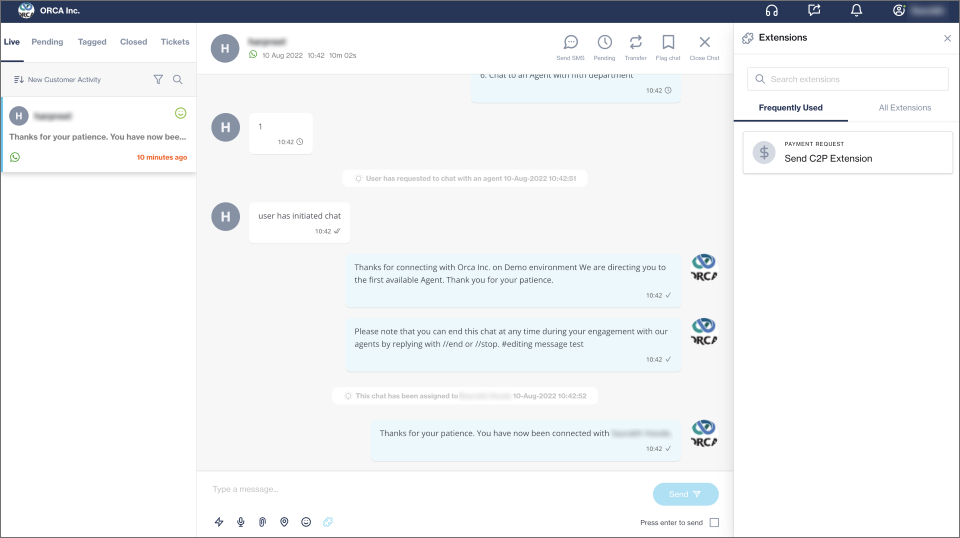
We've completely redesigned the extensions section. The improved designs allow agents to view all extensions along with two new functionalities: Frequently Used and Search.

<figure><img src="https://2380245535-files.gitbook.io/~/files/v0/b/gitbook-x-prod.appspot.com/o/spaces%2Fl8ao2e7ogQyZBti1BuxA%2Fuploads%2FhhkBzpVdvvhopruIYcZL%2Fimage.png?alt=media&#x26;token=e2549195-ac77-4517-8ff9-7b0fddb27725" alt=""><figcaption></figcaption></figure>

### WhatsApp Username

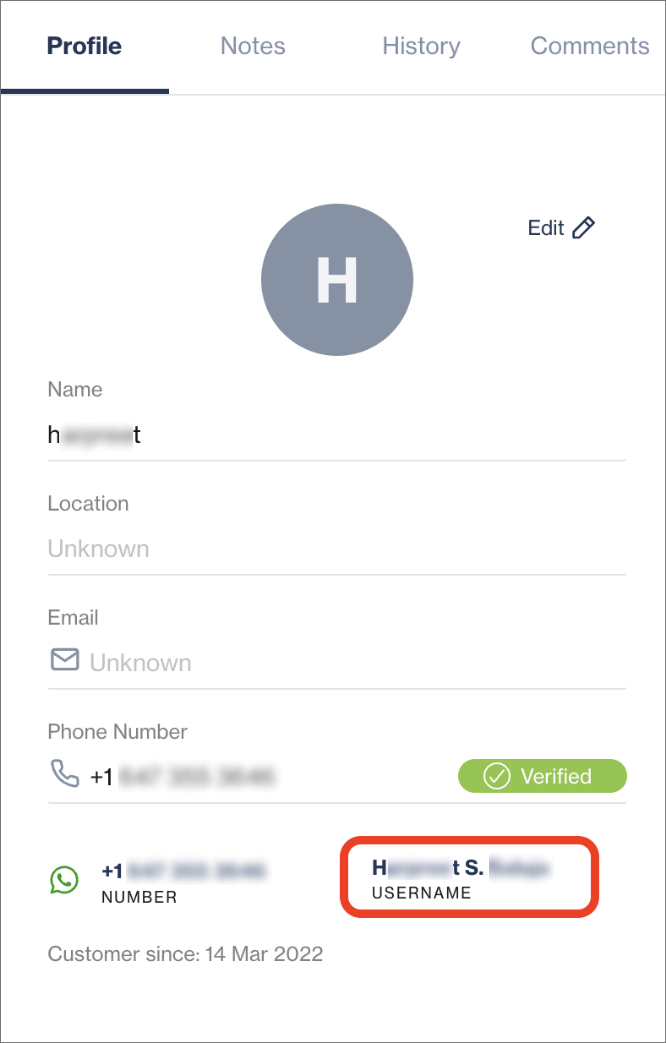
The username of end-users using WhatsApp is now displayed in the [Profile section](https://clickatell.gitbook.io/chat-desk/agent-chat-desk/chat-details-and-history). If the customer is new, the same username will also be used as the customer's name.

<figure><img src="https://2380245535-files.gitbook.io/~/files/v0/b/gitbook-x-prod.appspot.com/o/spaces%2Fl8ao2e7ogQyZBti1BuxA%2Fuploads%2FRRnhZMkSYrqJbuFnKSy7%2Fimage.png?alt=media&#x26;token=8dca43a3-311f-4b1d-8904-fccad98a464a" alt="" width="333"><figcaption></figcaption></figure>

## WhatsApp subscription bundle usage indicator

Release date: 4 August 2022

The WhatsApp subscription bundle usage indicator is a neat feature that tracks the total amount of the subscription bundle you've used each month, assisting you in budgeting and managing your subscriptions optimally.

<figure><img src="https://2380245535-files.gitbook.io/~/files/v0/b/gitbook-x-prod.appspot.com/o/spaces%2Fl8ao2e7ogQyZBti1BuxA%2Fuploads%2Fd6tlBNwG5IEldFosqmWU%2Fimage.png?alt=media&#x26;token=66d72304-ba50-4f91-a187-d857de4efd59" alt=""><figcaption></figcaption></figure>

## New: Embedded Client Authentication

Release date: 4 August 2022

{% hint style="info" %}

## Available on [**Interact** ](https://www.clickatell.com/products/interact/)and [**Transact** ](https://www.clickatell.com/transact/)packages.

{% endhint %}

We launched a new product that allows you to configure OpenID Connect in your Clickatell account and authenticate your end-users securely against your chosen identity provider so that they can access secure services specific to them from your internal platforms.

This feature is now available to all our clients, free of charge, from within the Clickatell Portal.

Currently, Embedded Client Authentication is supported on Chat Flow via the WhatsApp channel.

<figure><img src="https://2380245535-files.gitbook.io/~/files/v0/b/gitbook-x-prod.appspot.com/o/spaces%2Fl8ao2e7ogQyZBti1BuxA%2Fuploads%2FcTVoJZHaHoC2hhsUYjxd%2Fimage.png?alt=media&#x26;token=a3382f13-658d-4170-8d53-807d39d770c7" alt=""><figcaption></figcaption></figure>

<figure><img src="https://2380245535-files.gitbook.io/~/files/v0/b/gitbook-x-prod.appspot.com/o/spaces%2Fl8ao2e7ogQyZBti1BuxA%2Fuploads%2FJrLv30F8ju9GYipWilXT%2Fimage.png?alt=media&#x26;token=bc0fa2fe-de2d-49b1-a4a1-1e1a1c0d101d" alt=""><figcaption></figcaption></figure>

<figure><img src="https://2380245535-files.gitbook.io/~/files/v0/b/gitbook-x-prod.appspot.com/o/spaces%2Fl8ao2e7ogQyZBti1BuxA%2Fuploads%2FpT1iA2IP6frCrU5vC7M8%2Fimage.png?alt=media&#x26;token=132f710e-8204-4f40-b33a-ae874d855d8e" alt=""><figcaption></figcaption></figure>

All the IDPs you've set up in the [Clickatell Portal](https://clickatell.gitbook.io/embedded-client-authentication-user-guide/configure-and-update-an-identity-provider-idp) will dynamically pull through to your Chat Flow application. When setting up the [OAuth node](https://clickatell.gitbook.io/flow/user-facing-nodes/input-nodes/oauth-request) in Chat Flow, you'll be able to select from your IDPs the one you want to link to the node.

{% hint style="success" %}
For more information, see:

* [Configure Embedded Client Authentication](https://clickatell.gitbook.io/embedded-client-authentication-user-guide/configure-and-update-an-identity-provider-idp)
* [Using Embedded Client Authentication](https://clickatell.gitbook.io/embedded-client-authentication-user-guide/use-embedded-client-authentication)
* [FAQs](https://www.clickatell.com/help-center/embedded-client-authentication)
  {% endhint %}

## Other Enhancements & Improvements

Release date: 4 August 2022

## Communication preferences & notification banners

### Communication Preferences <a href="#communication-preferences" id="communication-preferences"></a>

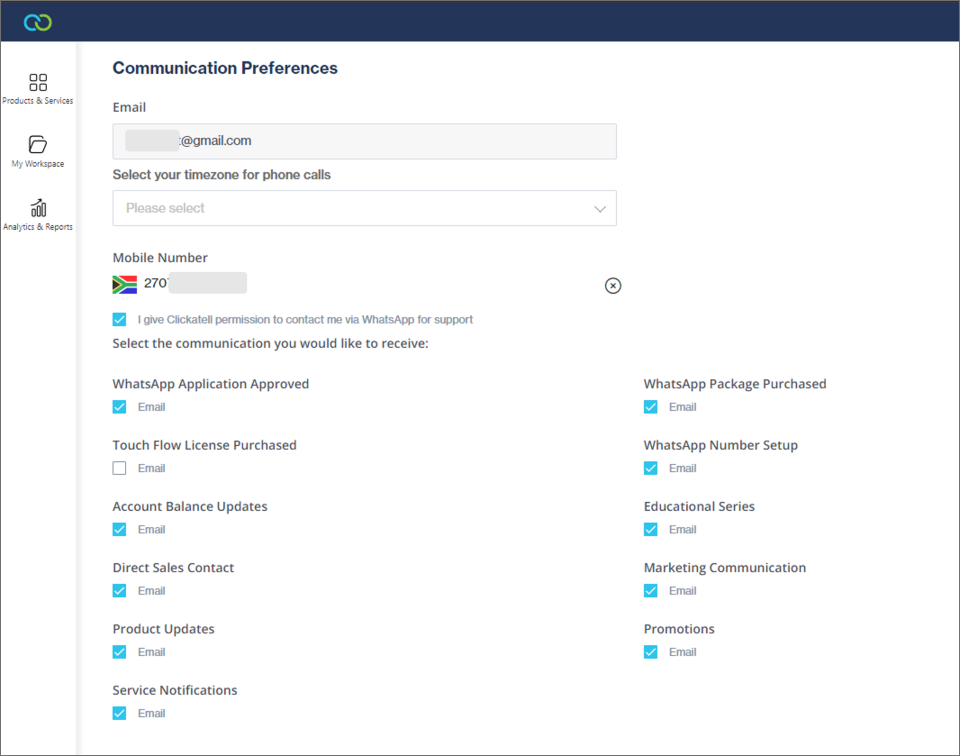
In your [Profile Settings](https://clickatell.gitbook.io/chat-commerce-platform/account-management/profile-settings), under communication preferences, you can now add a mobile number that is verified via a code sent to you. You can also select whether you want to allow our Support/Operations team to contact you via WhatsApp for any of their queries or help requested.

<figure><img src="https://2380245535-files.gitbook.io/~/files/v0/b/gitbook-x-prod.appspot.com/o/spaces%2Fl8ao2e7ogQyZBti1BuxA%2Fuploads%2FOpK3auVoIRHP1uRuACoV%2Fimage.png?alt=media&#x26;token=e5fa3df6-ef7b-47e5-add7-704cdaa83864" alt=""><figcaption></figcaption></figure>

### Portal Notification Banner Upgrade <a href="#portal-notification-banner-upgrade" id="portal-notification-banner-upgrade"></a>

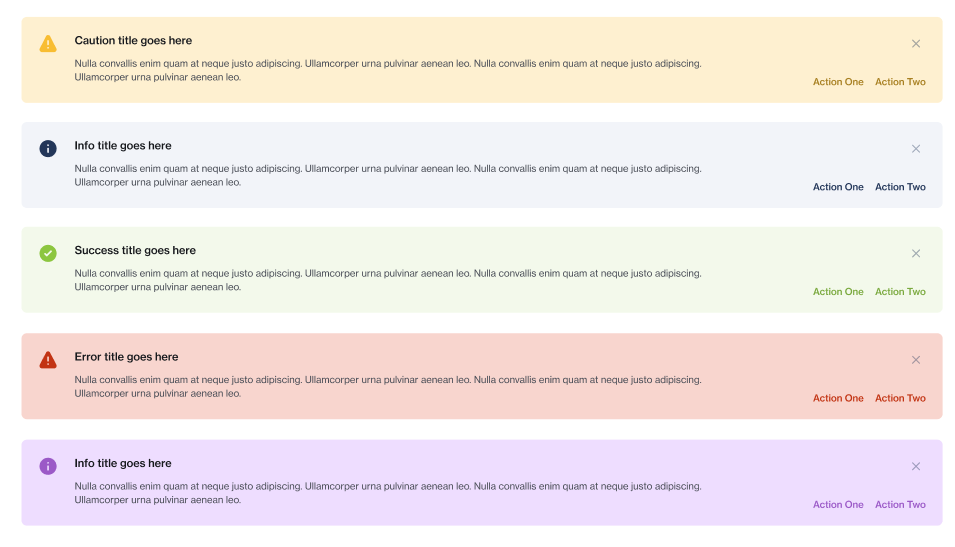
The Portal now boasts a new range of notification banners used throughout.

Most notable is the purple banner that gives you access to a step-by-step guide within a modal pop-up. These guides include extra information, such as how to provision products or complete configurations.

The banner upgrade also includes the green *success*, yellow *error,* and red *failed* notification banners, as well as a blue information banner.

<figure><img src="https://2380245535-files.gitbook.io/~/files/v0/b/gitbook-x-prod.appspot.com/o/spaces%2Fl8ao2e7ogQyZBti1BuxA%2Fuploads%2FEVVq3ki0WVKHB6pRkTIh%2Fimage.png?alt=media&#x26;token=5b398ec4-34da-424b-aca0-63cc178fc82a" alt=""><figcaption></figcaption></figure>

## 1-Click Deploy Process (Phase 1)

Release date: 30 June 2022

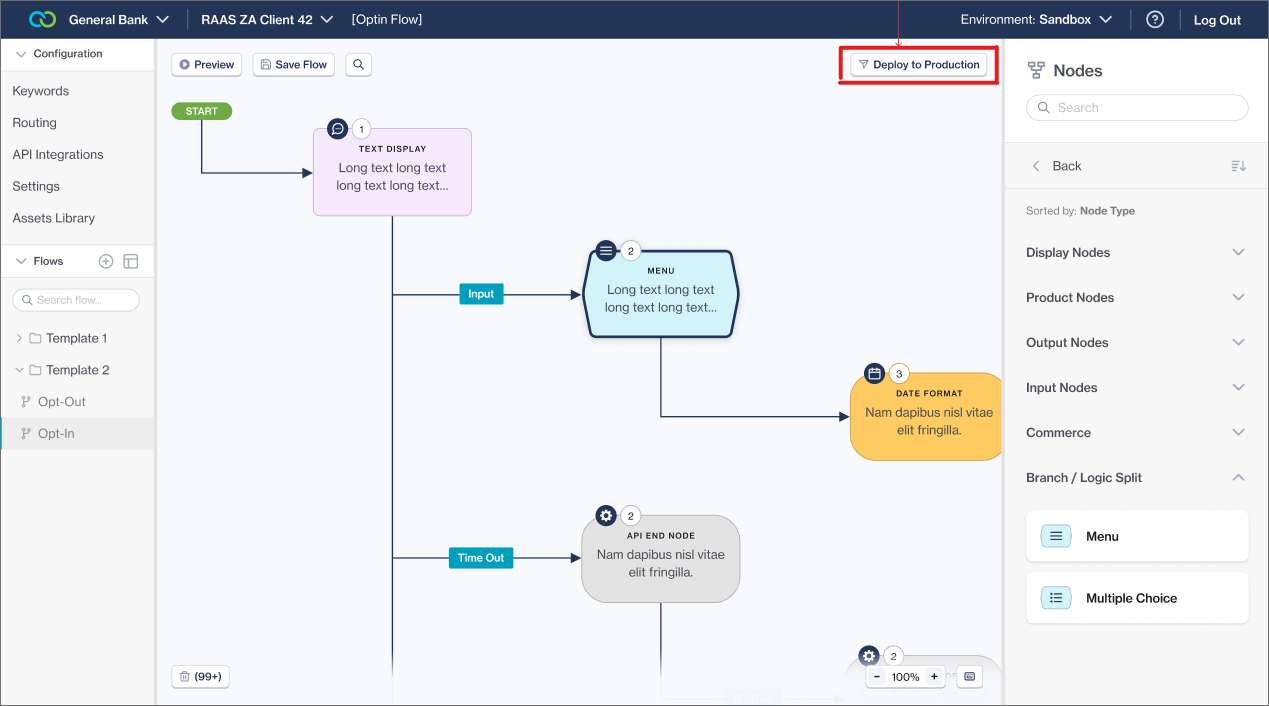
Up to now, the process to [approve and deploy](https://clickatell.gitbook.io/flow/workflow-management/approving-deploying-workflows) a flow was a two-person job. The flow-builder had to submit the flow for approval, and a second user (reviewing the flow/changes) was required to approve and deploy the flow before it was promoted to production. A user could not approve and deploy their own flows.

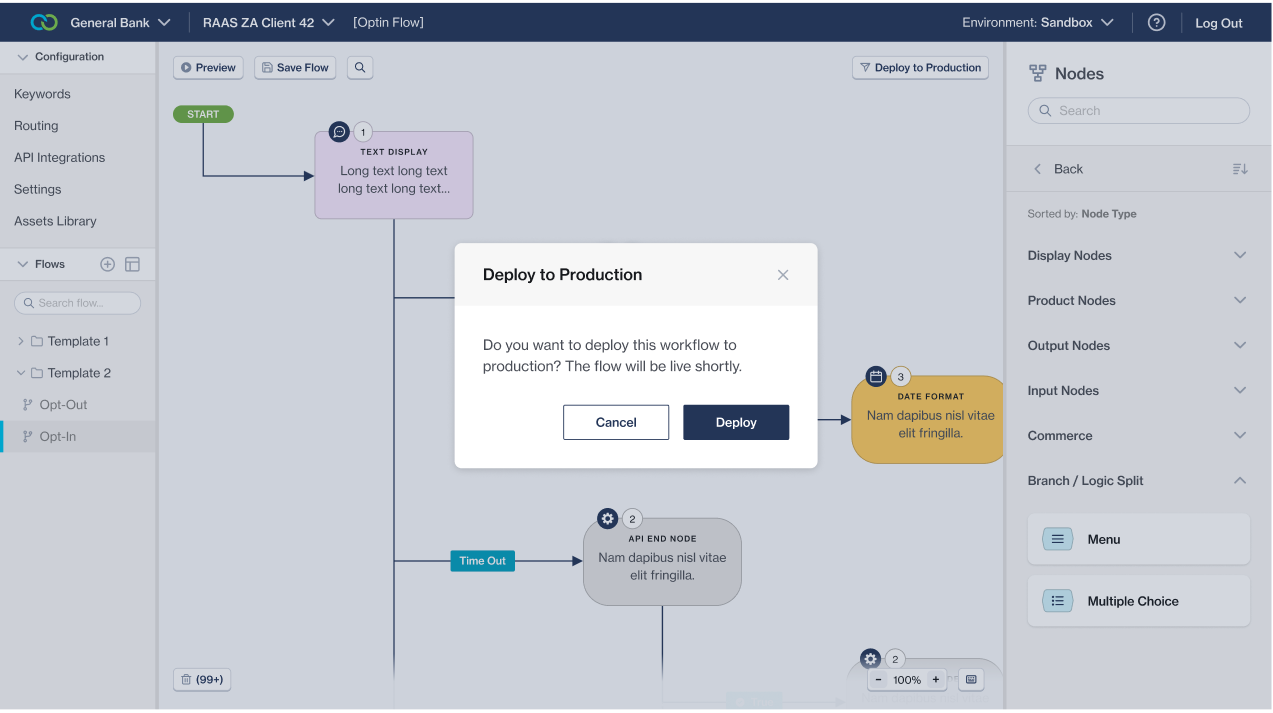
With this release, we've added another way for one person to approve and deploy flows without requiring a second 'user'. Once the simplified "*1-Click Deploy Process*" is enabled on a client's account, the flow-builder is allowed to deploy their own flows straight from the Chat Flow canvas, saving them a lot of time and frustration.

In Phase 1, this is a flag that can be set by Clickatell upon request from the client. In the next phase, we'll add it as a setting that our clients with Admin permission can set themselves.

<figure><img src="https://2380245535-files.gitbook.io/~/files/v0/b/gitbook-x-prod.appspot.com/o/spaces%2Fl8ao2e7ogQyZBti1BuxA%2Fuploads%2FjpnR99oKFdwY5M5sqQpD%2Fimage.png?alt=media&#x26;token=81e7a95e-949a-41bd-b895-e73c4f54d6aa" alt=""><figcaption><p>When the "1-Click Deploy Process" is enabled, the "Submit for Approval" button changes to "Deploy to Production"</p></figcaption></figure>

<figure><img src="https://2380245535-files.gitbook.io/~/files/v0/b/gitbook-x-prod.appspot.com/o/spaces%2Fl8ao2e7ogQyZBti1BuxA%2Fuploads%2FCZi30nyJNy908w7EDuFR%2Fimage.png?alt=media&#x26;token=d737cf7f-823f-4277-9b28-1d108ca0fefd" alt=""><figcaption><p>The flow-builder must simply confirm they want to continue with the flow deployment</p></figcaption></figure>

<figure><img src="https://2380245535-files.gitbook.io/~/files/v0/b/gitbook-x-prod.appspot.com/o/spaces%2Fl8ao2e7ogQyZBti1BuxA%2Fuploads%2FkoSNS0DQ5IG9fRR5z6oQ%2Fimage.png?alt=media&#x26;token=5048c53e-8b59-4572-95f5-659a6aec7280" alt=""><figcaption><p>All done! the flow-builder has promoted their own flow to production.</p></figcaption></figure>

## OAuth node & Previewer enhancements

Release date: 30 June 2022

### New OAuth Request Node

The [*OAuth Request* node](https://clickatell.gitbook.io/flow/user-facing-nodes/input-nodes/oauth-request) allows you to authenticate your end-users securely against your chosen identity provider (IDP) from within your workflow so that they can access secure services specific to them from your internal platforms.

{% hint style="info" %}
This is not available to all clients yet, but will be soon. Please reach out to our Support team if you have any questions or interest in this product.
{% endhint %}

### Previewer UX Enhancements

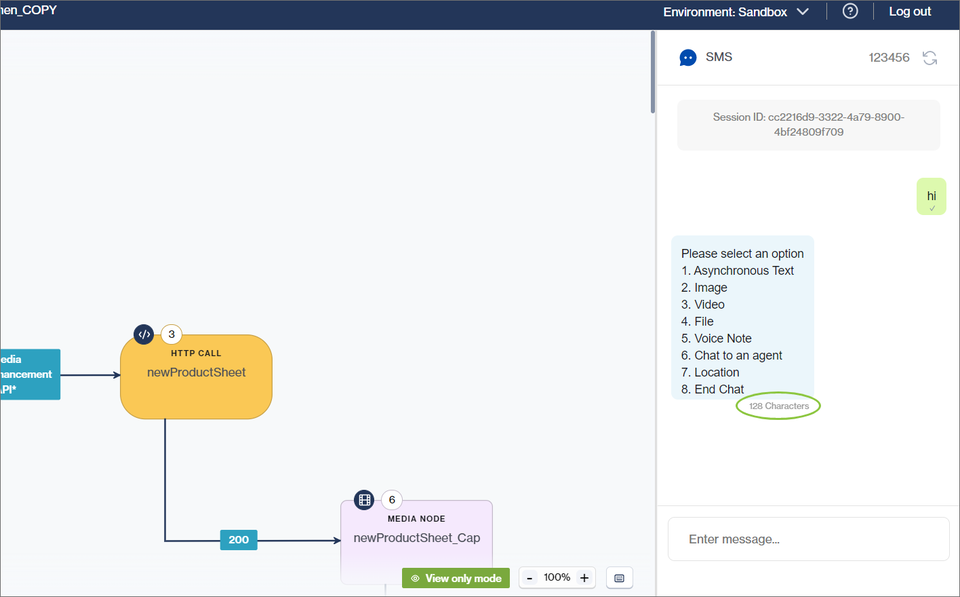
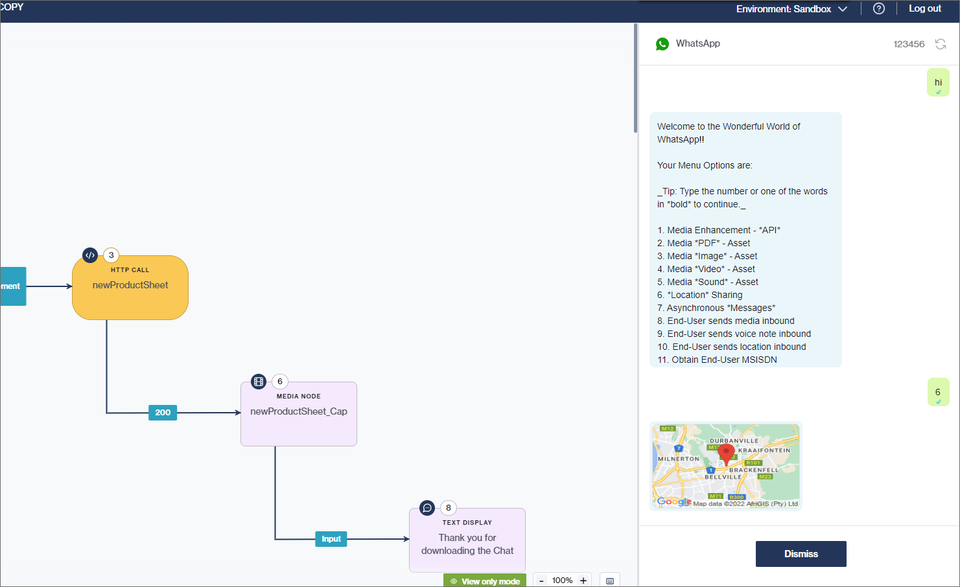
We've moved the [Previewer ](https://clickatell.gitbook.io/flow/workflow-management/using-the-previewer)from a pop-up modal in the center of the screen to the right side of the screen. It is also possible to resize the Previewer panel. This makes it easier for the flow-builder to view the flow they're building and their end-user's experience thereof simultaneously.

Secondly, we've updated the look and feel of the Previewer to ensure the user experience is more consistent with the rest of the Chat Flow product. We've also started adding more intuitive features per channel for the flow-builder to have a more real-life channel experience.

After the flow-builder selects the channel on which they want to preview the flow, the Previewer updates to present the flow-builder with a more realistic experience of the selected channel (*more exciting channels coming soon!*).

<figure><img src="https://2380245535-files.gitbook.io/~/files/v0/b/gitbook-x-prod.appspot.com/o/spaces%2Fl8ao2e7ogQyZBti1BuxA%2Fuploads%2Fs85fZ9XqP5z5Abf4z1Id%2Fimage.png?alt=media&#x26;token=ba23e25d-cd8d-45c8-8ba4-c2b80c5503e1" alt=""><figcaption><p>The SMS channel provides a simpler, text-only experience including a character count so flow-builders can correctly structure their messages</p></figcaption></figure>

<figure><img src="https://2380245535-files.gitbook.io/~/files/v0/b/gitbook-x-prod.appspot.com/o/spaces%2Fl8ao2e7ogQyZBti1BuxA%2Fuploads%2Fx305CQ78TkRKNcJfAH5o%2Fimage.png?alt=media&#x26;token=c8acd8bb-498c-4d64-9624-0f6928a681a5" alt=""><figcaption><p>The WhatsApp channel offers a rich experience, including media, location sharing, etc.</p></figcaption></figure>

For WhatsApp, we also implemented Business Read Receipts on the Previewer. This will offer the end-user a more realistic experience as they know and expect those familiar blue double-ticks.

<figure><img src="https://2380245535-files.gitbook.io/~/files/v0/b/gitbook-x-prod.appspot.com/o/spaces%2Fl8ao2e7ogQyZBti1BuxA%2Fuploads%2FsROzx7ZK7bI43VN6QOH4%2Fimage.png?alt=media&#x26;token=25c00584-b3e7-41c8-89f7-d30004c8c1a7" alt=""><figcaption></figcaption></figure>

## SMS support on Chat Desk

Release date: 29 June 2022

### Release Summary

The main focus of this release was on enabling SMS as a channel within [Chat Desk](https://clickatell.gitbook.io/chat-desk/overview/overview). We also resolved some bugs and addressed technical debt items. Chat Desk 3.1.1 also brings back the ability to download chat transcripts which was disabled in V3.0.0 due to technical reasons.

### New Channel: SMS

Chat Desk now supports SMS as a channel that end-users can use to communicate with agents.

All Chat Desk features are supported via SMS, with the exception of rich/interactive features and media support. Clients can now make use of plain text messaging (i.e., no media) as well as location sharing over SMS. Phone numbers for all SMS chats are also automatically marked as verified, instead of having to go through an OTP verification process.

<figure><img src="https://2380245535-files.gitbook.io/~/files/v0/b/gitbook-x-prod.appspot.com/o/spaces%2Fl8ao2e7ogQyZBti1BuxA%2Fuploads%2FEen3bXEhOehhVnL5kSYu%2Fimage.png?alt=media&#x26;token=ef1b856b-8969-4e7b-81b4-6bd8b5eeb903" alt=""><figcaption></figcaption></figure>

### Download Transcript feature re-enabled

The Download Transcript functionality was re-enabled on Chat Desk. Supervisors can now again download a PDF file containing the chat transcript by date and MSISDN from *Dashboard -> Configure​​-​​​ > Download Transcripts*​​​​​​​.

<figure><img src="https://2380245535-files.gitbook.io/~/files/v0/b/gitbook-x-prod.appspot.com/o/spaces%2Fl8ao2e7ogQyZBti1BuxA%2Fuploads%2F4f5t5iA8ZiHQFig7if3U%2Fimage.png?alt=media&#x26;token=e1ca3905-f59a-4e7a-8d02-c50d80bd89d7" alt=""><figcaption></figcaption></figure>

## Chat 2 Pay enhancements

Release date: 29 June 2022

### Release Summary

The focus of this release was to allow merchants to customize and uplift the payment experience for their customers. We also addressed some bugs and completed important work with regard to data and reporting requirements.

### Release Details

#### Payment page order details <a href="#order-detail-pass-through" id="order-detail-pass-through"></a>

The [Chat 2 Pay API](https://docs.clickatell.com/products/chat-2-pay/api-reference/) was updated to pass additional order information to the payment gateway's APIs. This additional order data that gets passed to Cybersource is displayed to your end-user on the payment page, providing more detailed information to your end-user.

When a customer pays for their order, they will see a list of their order items displayed on the payment page. The order details can contain details like Product ID, Product Name, Quantity, Price, and Tax.

An example of what this might look like is shown below.<br>

<figure><img src="https://2380245535-files.gitbook.io/~/files/v0/b/gitbook-x-prod.appspot.com/o/spaces%2Fl8ao2e7ogQyZBti1BuxA%2Fuploads%2FrbfHnTSMhaOqtvn2iswk%2Fimage.png?alt=media&#x26;token=39625ec1-ce6d-476c-ba5f-701bd7a4be48" alt="" width="563"><figcaption></figcaption></figure>

{% hint style="info" %}
Clickatell does \*\*not\*\* manage a catalog system. The order details are passed to Clickatell via \[APIs]\(<https://docs.clickatell.com/products/chat-2-pay/api-reference/>). The \*\*tax\*\* amount is handled by you and is passed through the \[API ]\(<https://docs.clickatell.com/products/chat-2-pay/api-reference/)to> Clickatell.
{% endhint %}

### Custom branding

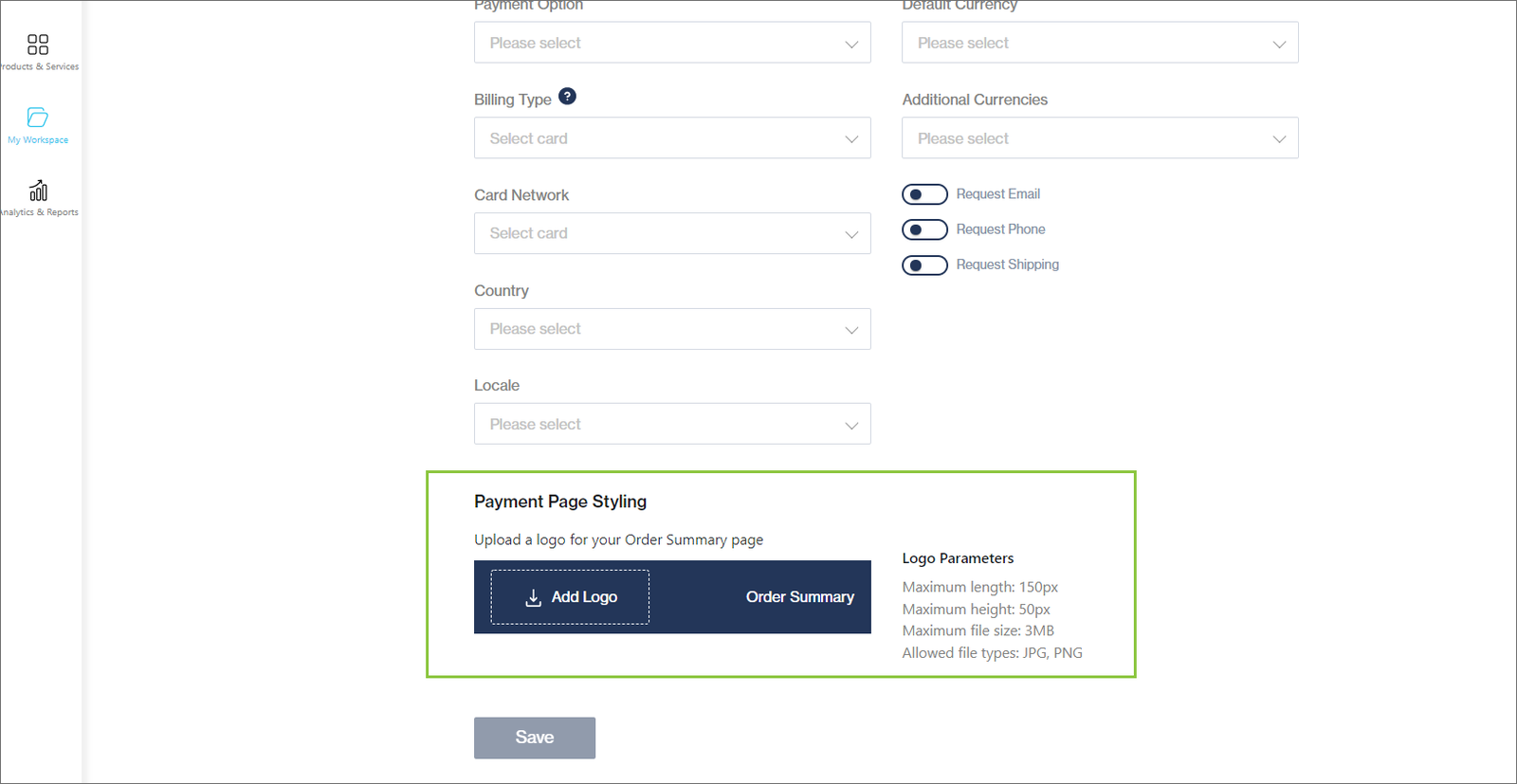
You can now upload your logo so that it shows on the payment page when your customers are checking out. You can do this on the [Payment Settings](https://clickatell.gitbook.io/chat-2-pay-user-guide/cybersource-and-salesforce/configuration-details/step-3-configure-the-extension) page.

<figure><img src="https://2380245535-files.gitbook.io/~/files/v0/b/gitbook-x-prod.appspot.com/o/spaces%2Fl8ao2e7ogQyZBti1BuxA%2Fuploads%2FOVzxsHjjBE9bMglhMnWi%2Fimage.png?alt=media&#x26;token=6ea975dd-591b-417c-82b7-a8c59139dca3" alt=""><figcaption></figcaption></figure>

<figure><img src="https://2380245535-files.gitbook.io/~/files/v0/b/gitbook-x-prod.appspot.com/o/spaces%2Fl8ao2e7ogQyZBti1BuxA%2Fuploads%2F4PwDimoI78HsRMr9ARGK%2Fimage.png?alt=media&#x26;token=179c51bd-81c0-4aeb-9908-dc2e4a59f1bc" alt=""><figcaption></figcaption></figure>

Once a merchant completes the steps detailed above, the logo will be displayed on the order summary and payment confirmation page<br>

<figure><img src="https://2380245535-files.gitbook.io/~/files/v0/b/gitbook-x-prod.appspot.com/o/spaces%2Fl8ao2e7ogQyZBti1BuxA%2Fuploads%2FpcnGUW6FtOlyWCAHtEjn%2Fimage.png?alt=media&#x26;token=e63d1e05-8c92-4892-84b6-eded552499f5" alt="" width="300"><figcaption></figcaption></figure>

#### Partial billing

*Billing Type* is a setting on the[ Chat 2 Pay Payment Settings configuration screen ](https://clickatell.gitbook.io/chat-2-pay-user-guide/cybersource-and-salesforce/configuration-details/step-3-configure-the-extension)that lets you decide if your customer should type in their billing details as part of the checkout experience. This applies to our current Cybersource integration.

Any customer-supplied billing information will be shown on both the Order Confirmation & Payment Summary Page.

<figure><img src="https://2380245535-files.gitbook.io/~/files/v0/b/gitbook-x-prod.appspot.com/o/spaces%2Fl8ao2e7ogQyZBti1BuxA%2Fuploads%2F5oHbzCC81H66UOawC0JJ%2Fimage.png?alt=media&#x26;token=ed7b08fd-7f71-463b-a367-ce8959f34304" alt="" width="542"><figcaption></figcaption></figure>

### Merchant Descriptor

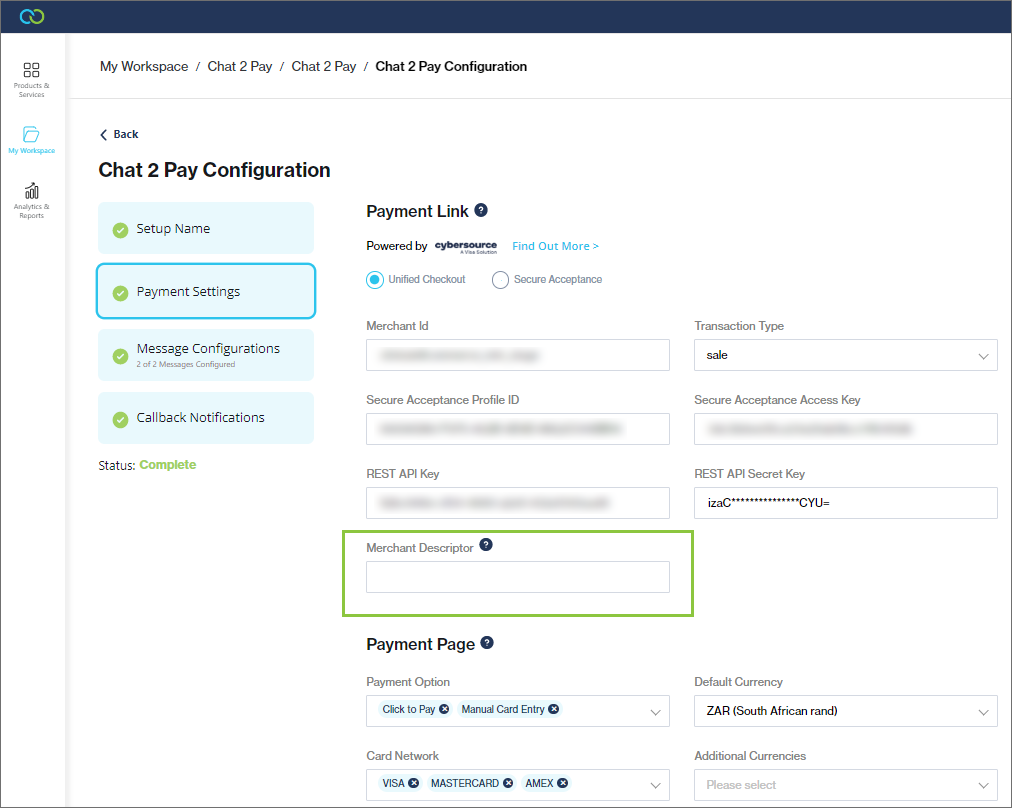
A merchant descriptor field was added to the [Payment Settings configuration screen](https://clickatell.gitbook.io/chat-2-pay-user-guide/cybersource-and-salesforce/configuration-details/step-3-configure-the-extension). This is the name that appears on both a merchant's and a customer's bank or credit card statement when a customer makes a purchase from the merchant.

<figure><img src="https://2380245535-files.gitbook.io/~/files/v0/b/gitbook-x-prod.appspot.com/o/spaces%2Fl8ao2e7ogQyZBti1BuxA%2Fuploads%2FrknwdCDNevpljBRjBjau%2Fimage.png?alt=media&#x26;token=a04a4ed9-dbfa-4ea0-b1b0-850552212868" alt=""><figcaption></figcaption></figure>

## New WhatsApp sign-up process

Release date: 29 June 2022

Embedded sign-up allows businesses to [**onboard onto the WhatsApp Business Platform directly from the Clickatell Portal**](https://clickatell.gitbook.io/whatsapp-user-guide/getting-started/create-a-whatsapp-business-account)**.** This embeddable onboarding flow simplifies the sign-up process, significantly reducing the time it takes to onboard and allowing you to get set up more quickly with WhatsApp.

You are guided step-by-step through the entire new WhatsApp sign-up journey from within the Clickatell Portal when adding a new WhatsApp Account & Profile.

<figure><img src="https://2380245535-files.gitbook.io/~/files/v0/b/gitbook-x-prod.appspot.com/o/spaces%2Fl8ao2e7ogQyZBti1BuxA%2Fuploads%2F75b4Zwr4jtqyblCZLoZM%2Fimage.png?alt=media&#x26;token=eb4929fa-574a-4601-9727-cb0a7405c3ee" alt=""><figcaption></figcaption></figure>

## Assets Library

Release date: 20 May 2022

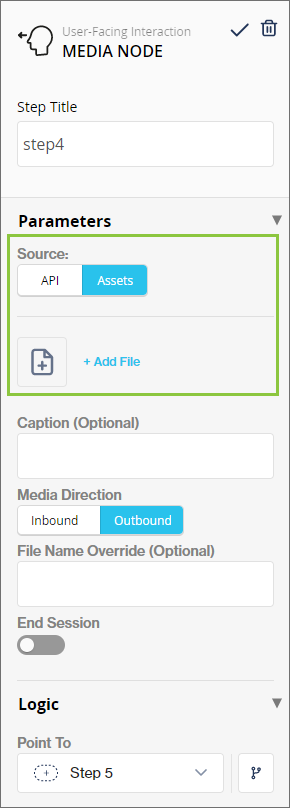
Previously, flow-builders had to configure API calls to fetch media from a hosted location before they could send a media file to their end-users. Enhancements have been made to the[ Media node ](https://clickatell.gitbook.io/flow/user-facing-nodes/display-nodes/user-facing-interactions-media-node)that enables the flow-builder to select the source of the media file they want to send. Flow-builders can still use API calls to fetch media from a hosted location, or they can choose to select media that has been uploaded to the [assets library](https://clickatell.gitbook.io/flow/configuration/manage-your-workflow-assets) to more easily incorporate media into flows and send it to end-users.

<figure><img src="https://2380245535-files.gitbook.io/~/files/v0/b/gitbook-x-prod.appspot.com/o/spaces%2Fl8ao2e7ogQyZBti1BuxA%2Fuploads%2FS5Ca2WBVW0tTUtUOYhCg%2Fimage.png?alt=media&#x26;token=6db505b3-4458-4c12-a25b-dde9c83c92a4" alt="" width="218"><figcaption><p>Enhanced Media Node</p></figcaption></figure>

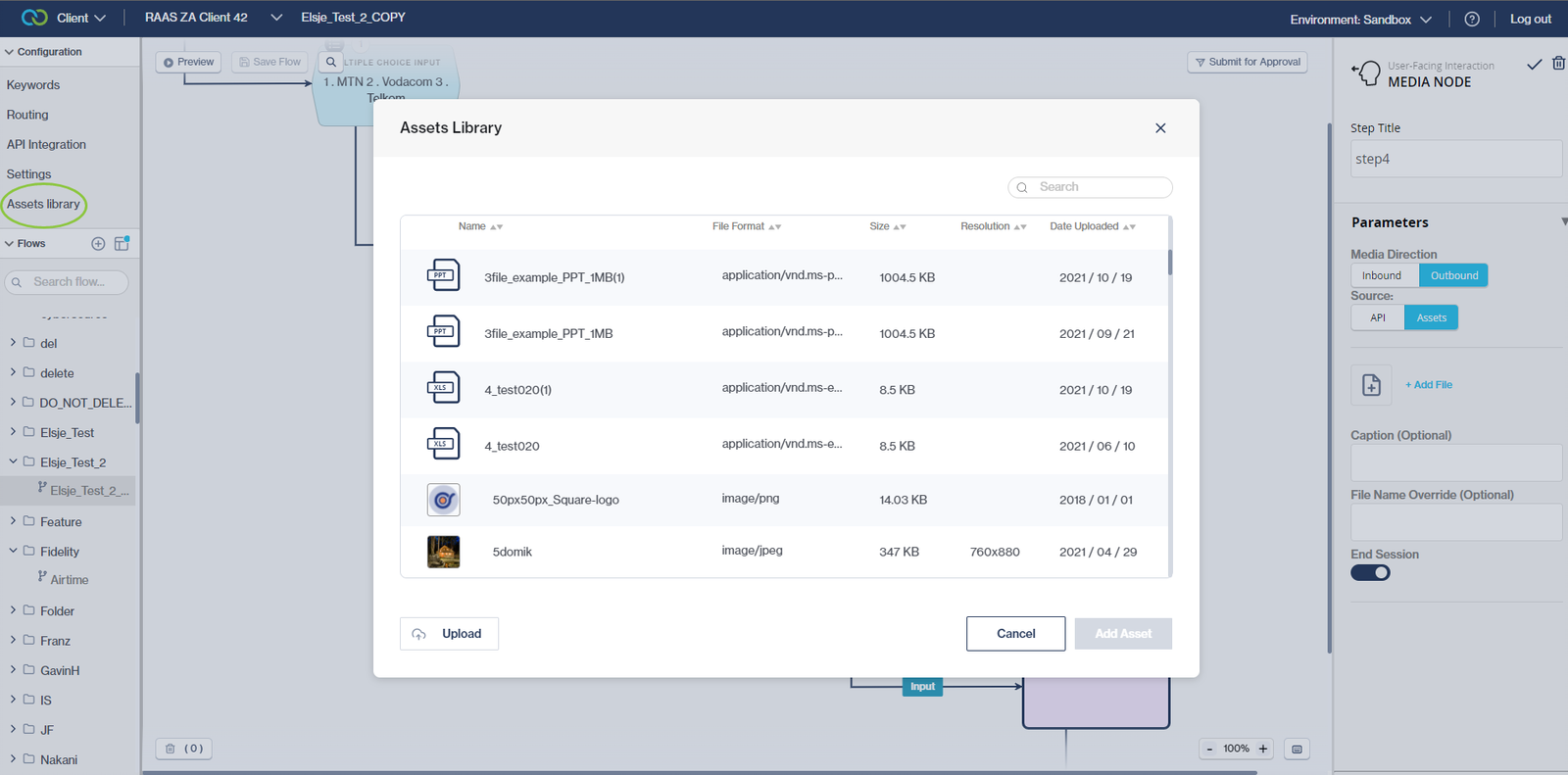
Clicking "*+Add File*" (see above) will open the Assets Library where media files are managed and selected. The Assets Library is also accessible via the left pane under the "Configuration" section.

<figure><img src="https://2380245535-files.gitbook.io/~/files/v0/b/gitbook-x-prod.appspot.com/o/spaces%2Fl8ao2e7ogQyZBti1BuxA%2Fuploads%2F9QQino3uszKucCWVALUE%2Fimage.png?alt=media&#x26;token=e6599061-1679-429b-a232-b7eb947c479a" alt=""><figcaption><p>The Assets Library</p></figcaption></figure>

## API Integration screen enhancement

Release date: 20 May 2022

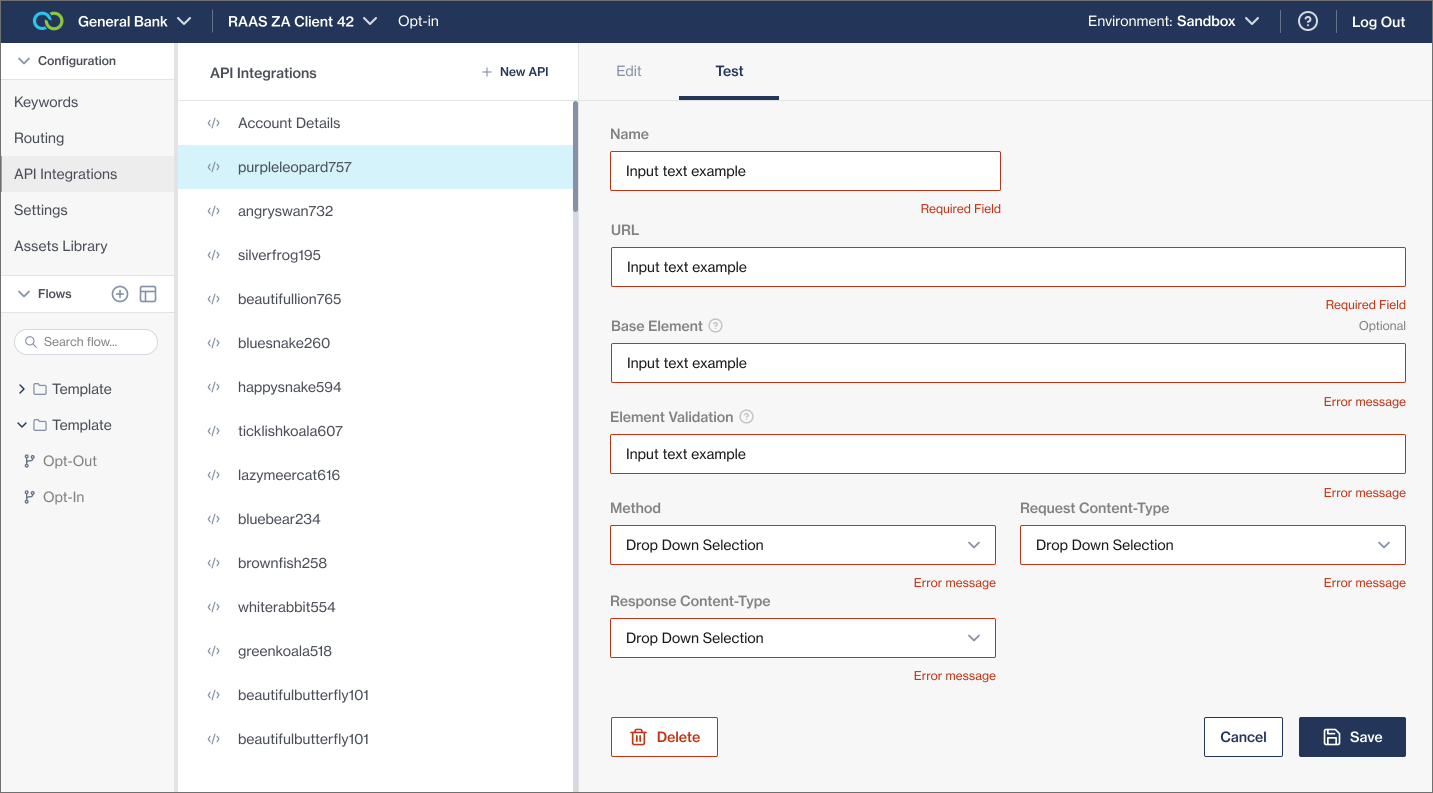
We've added the ability to add Headers as key-value pairs on the [API Integration](https://clickatell.gitbook.io/flow/configuration/api-integration) screen.

Previously, managing different UAT/Prod API Keys was challenging and time-consuming as they could only be set on the [HTTP Call node](https://clickatell.gitbook.io/flow/action-nodes/action-nodes-api-integration) itself, which meant that every time you prepared a release, each individual HTTP Call node had to be updated with the applicable API keys.

With this latest release, it is now easier for flow-builders to configure the API keys only once on the API level instead of updating them on each node.

We've also updated the styling of this screen to match the new Chat Flow UI as part of the ongoing 'face-lifting' mission.

<figure><img src="https://2380245535-files.gitbook.io/~/files/v0/b/gitbook-x-prod.appspot.com/o/spaces%2Fl8ao2e7ogQyZBti1BuxA%2Fuploads%2F3JajsirmNkCvfjhrjQhk%2Fimage.png?alt=media&#x26;token=7e2e015e-f190-4723-9a9e-472982fd1e7e" alt=""><figcaption><p>Enhanced API Integration Screen</p></figcaption></figure>

## Other Enhancements & Improvements

## Billing information & closing accounts

Release date: May - June 2022

### Billing Information Pop-Up

In the Clickatell Portal, we've updated the user experience for new and existing customers who haven't set up their billing information. Instead of removing you from your current user journey to complete your billing details somewhere else, an embedded modal pops up, allowing you to complete their details from where you are. You can also still access and update your [Billing and Payments](https://clickatell.gitbook.io/chat-commerce-platform/account-management/billing-and-payments) details as usual.

<figure><img src="https://2380245535-files.gitbook.io/~/files/v0/b/gitbook-x-prod.appspot.com/o/spaces%2Fl8ao2e7ogQyZBti1BuxA%2Fuploads%2Fa5aklRLaVAh2AEFy0C1b%2Fimage.png?alt=media&#x26;token=39151acf-9d55-42df-b323-9ff05f73604d" alt=""><figcaption></figcaption></figure>

### Close Account

Customers can close their Clickatell account and no longer receive any communication or updates, while all their account information gets encrypted and archived in alignment with our Data Retention Policy.

You can now close your account by navigating to [*Account Details*](https://clickatell.gitbook.io/chat-commerce-platform/account-management/account-details#close-your-account) from the Profile menu. The customer is informed of the result of their action and must re-enter their credentials to confirm the account closure.

<figure><img src="https://2380245535-files.gitbook.io/~/files/v0/b/gitbook-x-prod.appspot.com/o/spaces%2Fl8ao2e7ogQyZBti1BuxA%2Fuploads%2F9GguZm5N9j8EnU9oyiNT%2Fimage.png?alt=media&#x26;token=21bedb4e-d58d-4fca-acc2-92ab61af07b6" alt=""><figcaption></figcaption></figure>

<figure><img src="https://2380245535-files.gitbook.io/~/files/v0/b/gitbook-x-prod.appspot.com/o/spaces%2Fl8ao2e7ogQyZBti1BuxA%2Fuploads%2F3aUewwc0TD2R3prRvqQO%2Fimage.png?alt=media&#x26;token=62930be7-3834-4000-a068-0d5aef2a09c2" alt=""><figcaption></figcaption></figure>

## SMS Stop List Report

Release date: 31 March 2022

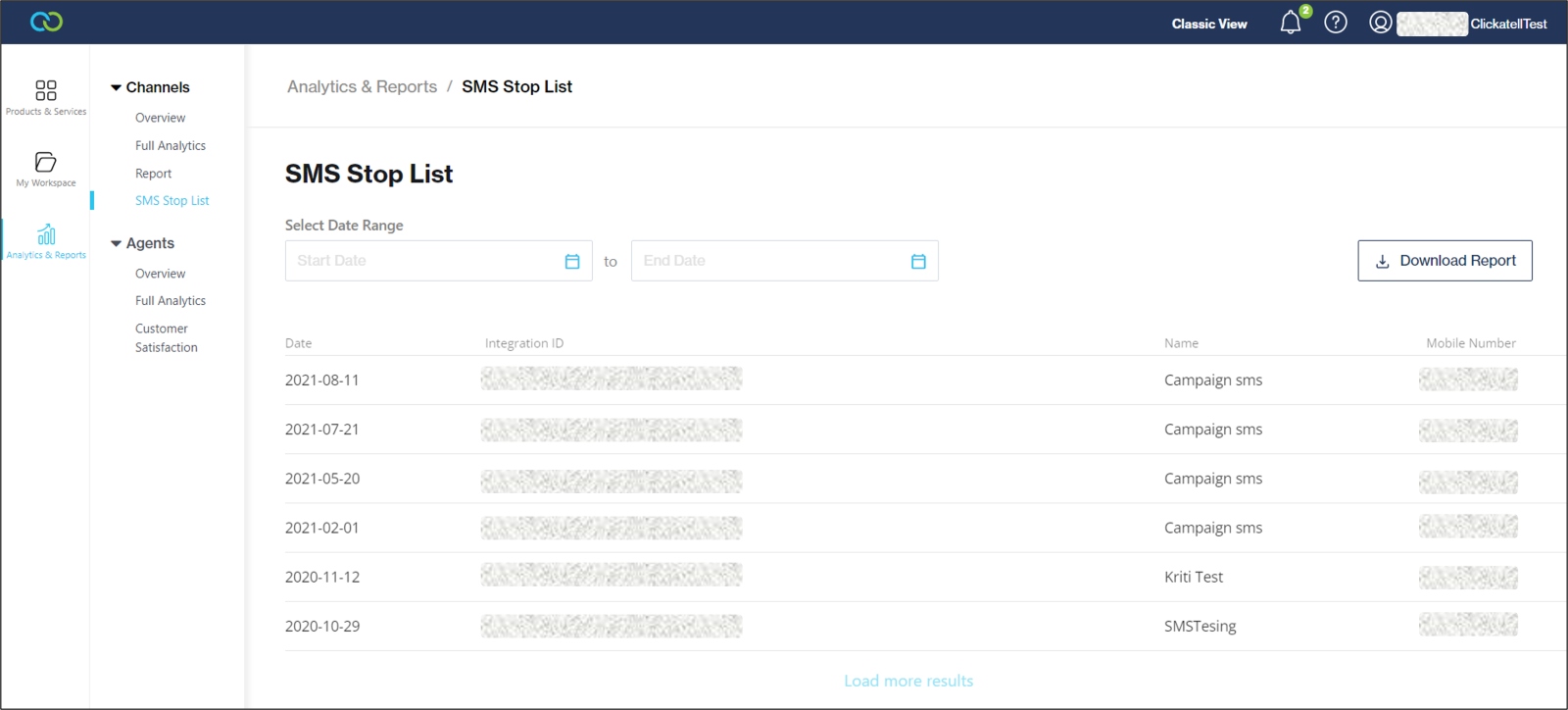
The[ SMS Stop List report ](/data/dashboards/messaging-channels.md#sms-stop-list)was added to the Clickatell Portal. This report enables customers to view all their end-users who have opted out via the SMS channel. The report is available in the Clickatell Portal under *Analytics & Reports -> Channels -> SMS Stop List.*

Customers can select a date range and view a complete record of end-users opting out of their SMS communication. The report is also downloadable as a .csv file.

<figure><img src="https://2380245535-files.gitbook.io/~/files/v0/b/gitbook-x-prod.appspot.com/o/spaces%2Fl8ao2e7ogQyZBti1BuxA%2Fuploads%2F2k1AxH95YS93SUCFjM2y%2Fimage.png?alt=media&#x26;token=98d0923b-51fb-48de-8f63-a293cfb91943" alt=""><figcaption></figcaption></figure>

## WhatsApp conversation-based pricing and reporting updates

Release date: 31 March 2022

* Implemented [WhatsApp conversation-based pricing](https://www.clickatell.com/blog/whatsapp-business-pricing-update/).
* Updated reporting for [WhatsApp interactive messaging](/whatsapp/channel-capabilities/interactive-messages-lists-reply-buttons-location-requests.md#what-are-interactive-messages).

## WhatsApp Interactive Messages

Release date: 25 March 2022

[Interactive messages](https://clickatell.gitbook.io/whatsapp-user-guide/channel-capabilities/interactive-messages) (List Messages and Reply Buttons) give your users a simpler and more consistent way to find and select what they want from your business on WhatsApp. There are two types of interactive messages, i.e. **list messages** (up to 10 options) and **reply buttons** (up to 3 buttons).

{% hint style="success" %}
You can also refer to [this page](https://developers.facebook.com/docs/whatsapp/guides/interactive-messages/) created by WhatsApp for more information on Interactive Messages.
{% endhint %}

With the latest Chat Flow release, Clickatell clients can send interactive messages as part of their WhatsApp workflow using the [Menu node](https://clickatell.gitbook.io/flow/user-facing-nodes/branch-logic-split/menu-nodes-menu-with-options) or [Multiple Choice Input node](https://clickatell.gitbook.io/flow/user-facing-nodes/branch-logic-split/menu-nodes-multiple-choice-input).

<figure><img src="https://2380245535-files.gitbook.io/~/files/v0/b/gitbook-x-prod.appspot.com/o/spaces%2Fl8ao2e7ogQyZBti1BuxA%2Fuploads%2FAQ9EIubNYnL0obiKNeuk%2Fimage.png?alt=media&#x26;token=ce46c9b7-3bf9-4b4c-a43a-a3b1803b31a4" alt=""><figcaption><p>Example: List Message in WhatsApp</p></figcaption></figure>

The interactive messages are easy to set up and do not require any API integrations. Options/buttons are static and not dynamically populated.

You can select how you want to display the menu options to the end-user from the *WhatsApp Display Type* drop-down. This defaults to 'Numbered List'. 'Auto Select' means the Chat Flow application automatically decides how to display the options based on the number of options added:

* Less than 3 options: display as buttons
* 4 - 10 options: display as list message
* More than 10 options: display as a numbered list (text only, not interactive)

For more detail on setting up interactive WhatsApp messages in Chat Flow, see [here](https://clickatell.gitbook.io/flow/channel-capabilities/use-whatsapp-with-chat-flow/whatsapp-interactive-messages).

## User Experience Enhancements

### Enhanced onboarding experience for Routing, API Integrations, Keywords sections <a href="#enhanced-onboarding-experience-for-routing-api-integrations-keywords-sections" id="enhanced-onboarding-experience-for-routing-api-integrations-keywords-sections"></a>

As part of our ongoing effort to improve the [Chat Flow](https://clickatell.gitbook.io/flow/overview/overview) user experience, we've enhanced the *Routing*, *API Integration*, and *Keyword* pages. We now provide the flow-builder with tooltips, help text, and validation messages to guide them in what is expected of them when adding new routes/API integrations/keywords.

<figure><img src="https://2380245535-files.gitbook.io/~/files/v0/b/gitbook-x-prod.appspot.com/o/spaces%2Fl8ao2e7ogQyZBti1BuxA%2Fuploads%2FAF6f2NVyDZCBWe1r7Gj0%2Fimage.png?alt=media&#x26;token=11f3938f-8291-4918-ab39-1856dfbf7e7f" alt=""><figcaption><p>Tooltips and updated look &#x26; feel</p></figcaption></figure>

<figure><img src="https://2380245535-files.gitbook.io/~/files/v0/b/gitbook-x-prod.appspot.com/o/spaces%2Fl8ao2e7ogQyZBti1BuxA%2Fuploads%2FaMmCNCUV2WrB9emPsaFJ%2Fimage.png?alt=media&#x26;token=7b6e3f20-3894-47ac-92ea-756b62f1e04f" alt=""><figcaption><p>Field validation and help text</p></figcaption></figure>

### Provide a better visual experience when selecting the Next Step / Flow <a href="#provide-a-better-visual-experience-when-selecting-the-next-step-flow" id="provide-a-better-visual-experience-when-selecting-the-next-step-flow"></a>

When setting up a [node ](https://clickatell.gitbook.io/flow/workflow-management/create-new-flow)in Chat Flow, the user selects the next step/flow where the user must be directed given a certain response/result.

We've improved the way that the flow-builder can select this next step/flow:

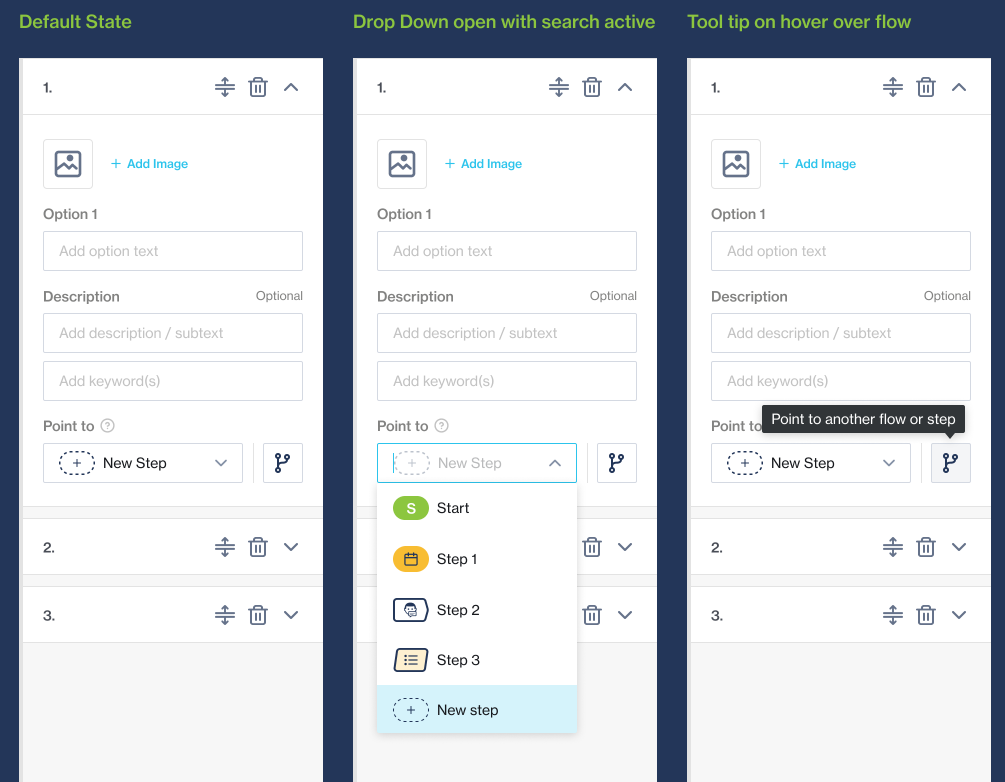
* **Direct user to "Next Step"**: search and select an existing step in the flow, or add a new step to your flow and direct the user there
* **Transfer user to another flow:** Click the ‘*flow*’ button to launch a new interactive modal

<figure><img src="https://2380245535-files.gitbook.io/~/files/v0/b/gitbook-x-prod.appspot.com/o/spaces%2Fl8ao2e7ogQyZBti1BuxA%2Fuploads%2Fzm9hr0EoXUI9UQi6kjE6%2Fimage.png?alt=media&#x26;token=110f3646-4ce2-4b4b-965b-51083e0b7726" alt=""><figcaption></figcaption></figure>

In the new interactive modal, the flow-builder can scroll/search and select the flow from the left-hand panel. Once selected, the flow opens (in read-only mode) allowing the flow-builder to select the exact step within this flow where the end-user must be transferred to.

<figure><img src="https://2380245535-files.gitbook.io/~/files/v0/b/gitbook-x-prod.appspot.com/o/spaces%2Fl8ao2e7ogQyZBti1BuxA%2Fuploads%2FMYFfiyR6jVLrXXnS6PWg%2Fimage.png?alt=media&#x26;token=5fe2a6af-adfb-497b-9f53-4381121abca2" alt=""><figcaption></figcaption></figure>

After making a selection, the modal will close, and the folder name/flow name will be displayed in the node:

<figure><img src="https://2380245535-files.gitbook.io/~/files/v0/b/gitbook-x-prod.appspot.com/o/spaces%2Fl8ao2e7ogQyZBti1BuxA%2Fuploads%2FY6yl8pBP284hxCDNFImS%2Fimage.png?alt=media&#x26;token=b3a1fe2c-eca5-4cbc-bff2-81f1c8e64f07" alt="" width="563"><figcaption></figcaption></figure>

## Performance improvements

### Release Summary

Release date: March 2022

This release consisted of some major backend changes to significantly improve the [Chat Desk ](/chat-desk/overview/overview.md)application's performance.


---

# Agent Instructions: Querying This Documentation

If you need additional information that is not directly available in this page, you can query the documentation dynamically by asking a question.

Perform an HTTP GET request on the current page URL with the `ask` query parameter:

```
GET https://help.clickatell.com/release-notes/release-notes-3.md?ask=<question>
```

The question should be specific, self-contained, and written in natural language.
The response will contain a direct answer to the question and relevant excerpts and sources from the documentation.

Use this mechanism when the answer is not explicitly present in the current page, you need clarification or additional context, or you want to retrieve related documentation sections.