For the complete documentation index, see llms.txt. This page is also available as Markdown.

Release notes

New: Clickatell AI

Available on the Interact or Transact packages as an upgrade at an additional cost.

Release date: 2024

The Clickatell AI service enables you to build, customize, and train modern AI assistants built on a hosted large language model (LLM) and pre-trained on specific information provided by your business. It lets your customers ask questions and extract accurate, concise, and contextually relevant answers from a chatbot, referencing the information it was trained on, or from a live agent supported by the virtual assistant in our help desk application.

The service is available across the Clickatell Platform.​ It is channel-agnostic and can be used across business divisions.

The following AI capabilities are built into the Clickatell Chat Commerce Platform:

See our comprehensive Clickatell AI User Guide for details on using the application.

The following forms part of the Clickatell AI release:

  • A new Clickatell AI portal to configure and train assistants, manage information, and configure intents.

  • Suggested responses, powered by one of your selected AI assistants, are presented to live agents in Chat Desk to assist in answering customer queries.

  • A new Clickatell AI setting in Chat Desk to enable/disable suggested responses and to select the AI assistant to generate these responses.

  • A new Clickatell AI node in Chat Flow enables direct interaction between end-users and an AI assistant trained to provide information within a specific business context.

Enhanced templates & increased frequency

Release date: 4 November 2024

Below is a summary of the updates made to our Data Sharing Service offering. Reach out to your account manager or our support team for more information.

Enhanced Data Sharing Templates

As of November 4, 2024, all clients who have signed up for our Data Sharing Services will have access to enhanced data templates, including:

  • Several new data fields provide additional insights into your applications’ performance.

  • An accompanying manifest file per template containing a summary view of the data in each template (if downloads occur daily or more frequently).

  • A data dictionary with detailed definitions of each data element and possible values.

Additional frequencies: 4-hourly and hourly

The weekly Data Sharing service is included as standard in all packages. Clients can upgrade to a higher frequency delivery at an additional cost. Previously, you had the option to upgrade to daily delivery and with this release, you can now also opt for 4-hourly or hourly delivery.

WhatsApp: Free service conversations

Release date: 1 November 2024

Whenever a WhatsApp user messages your business, a 24-hour timer called a customer service window starts (or refreshes if one has already been started). When a free-form message is delivered by the business in response, with no open conversation of any other category open between your business and that user, a service conversation is opened.

Starting November 1, 2024, all service conversations are completely free for all businesses.

Previously, each WhatsApp Business Account received 1,000 free service conversations per month and paid Meta a fee for each additional conversation, but this threshold has now been removed.

Business benefits:

  • Reduction in costs for existing customer journeys​.

  • Improved ROI for IVR and call center deflection​ use cases.

  • An increase in the number of service-related use cases.

Onboarding for prepaid SMS clients & name change

Release date: 17 October 2024

Onboarding for prepaid SMS clients

Our new campaign-sending tool, Broadcast Messenger, is now also available to our prepaid SMS customers. You can activate Broadcast Messenger via the Clickatell Portal by following the steps described here.

Name change

Previously, we had a Campaign Manager (SMS only) and a WhatsApp Campaign Manager. As our WhatsApp Campaign Manager now also supports the SMS channel for all clients, we’ve renamed it to Broadcast Messenger with the plan to sunset the legacy SMS Campaign Manager in the future.

SMS: Changes in test message sending

Release date: 17 October 2024

Our SMS test message feature now requires a positive account balance to enable. Note that SMS test messages remain completely free and will not be deducted from your balance. You can add two test phones per account, and the number of free test SMS messages you can send per account is limited to 10 per day with an overall maximum of 100 per month.

WhatsApp: No support for HSM template format

Release date: 17 October 2024

Clickatell no longer supports the old WhatsApp HSM template format.

Meta deprecated support for HSMs several years ago and Clickatell has been converting this format in a manner that Meta understands since then. We are now officially ending our support of this format, and any template sent using the HSM structure will fail to deliver.

Please ensure your message template structures are updated accordingly if not done yet.

WhatsApp: Cloud vs On-Prem Parity

Release date: 29 August 2024

The following features are now supported for cloud-hosted WhatsApp numbers. Previously these were only supported for on-prem WhatsApp numbers.

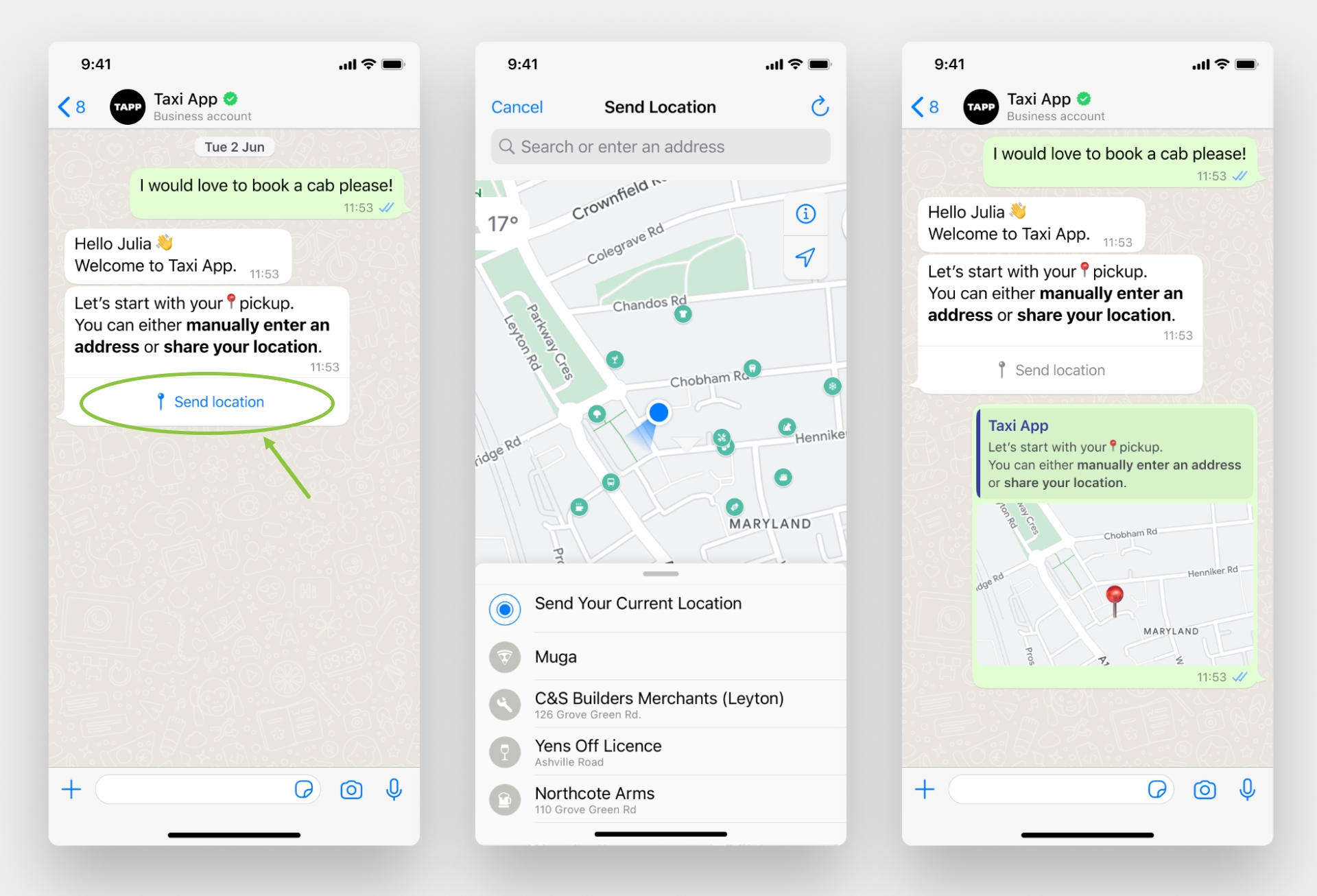
  • Location request messages: These messages request your end-user's location. They contain body text and a Send location button that opens a location-sharing screen when tapped so end-users can share their location. Read more here.

  • Coupon code templates: These marketing templates display a single copy code button. When tapped, the code is copied to the end-user's clipboard. Read more here.

  • Catalog templates: These marketing templates allow you to showcase your product catalog entirely within WhatsApp. Read more here.

  • Single-Product Messages: Messages with a single product item from the business's inventory. (Available via One API only). Read more here.

  • Multi-Product Messages: Messages with up to 30 product items from the business's inventory. Read more here.

WhatsApp: Data Localization

Release date: 29 August 2024

Cloud API Local Storage allows clients to control where their message data is stored at rest. If a company is in a regulated industry such as finance, government, or healthcare, they may prefer to have message data stored in a specific country when at rest, due to these regulatory requirements or company policies.

Clickatell now supports data localization, which means:

  • With any new WhatsApp number that a client registers, they can select the country where their data at rest should be hosted. This is specified per number.

  • Clients have the following options to select from:

    • APAC: India, Singapore, Indonesia, South Korea, Japan, Australia

    • LATAM: Brazil

    • MEA: South Africa, Bahrain, UAE

    • Europe: EU (Germany), UK, Switzerland

    • NORAM: Canada, USA

  • Once selected, clients cannot change the locale again.

  • If nothing is selected, Germany is selected as the default.

    For more information, please reference this page by Meta.

When setting up a new WhatsApp number you have the option to edit the location and choose from the provided locations.

Node Search Enhancement (Find & Replace)

Release date: 22 August 2024

Previously, users could only search for a specific step number in a workflow. With the latest release, users can now also search for all occurrences of a specific word within a workflow and can replace the word with another.

For the workflow selected and visible in the canvas:

  • Users have the option to Find only or to Find & Replace. (default: Find)

  • Users can search on Step Number only, on Variable only, or on All. (default: All)

  • Users can make the search case sensitive. (default: not case sensitive)

  • Users can select to search whole word matches only. (default: search whole words and parts thereof)

    For more details, see the Chat Flow User Guide.

Ticket creation user journey outside of support hours

Release date: 30 July 2024

Previously, when an end-user reached Chat Desk outside the set support hours and opted not to leave a message, the user would not be routed back to the Chat Flow journey. With this release, we've improved the user journey to route the user back to Chat Flow to continue with the self-service bot when interacting with the business out of support hours.

In summary, the process now works as follows:

  1. End-user sends a message to the business outside of its set support hours.

    1. If a ticket doesn't exist for this end-user, a ticket is created.

    2. If a ticket exists for this end-user, no new ticket is created and the existing ticket is appended.

  2. End-user receives the auto-responders: "Thank you for reaching out. You've reached us outside of our support hours. We will get back to you as soon as possible. Would you like to leave a message for the agent? Please respond with YES or NO."

    1. Responds with “NO”: A thank you message is displayed, the session ends, and the end-user is returned to the main menu.

    2. Responds with “YES”: Another auto-responder is shown asking the end-user to enter their message. Once entered, it displays a confirmation message, ends the session, and returns the end-user to the main menu.

    3. If no reply, the session ends when the timeout duration is reached.

    4. If anything other than Yes/No is entered (not case sensitive), the same auto-responder is displayed again.

  3. If the end-user reaches out to the business out of support hours again, the message will be appended to the existing ticket.

User journey when responding with "No".
User journey when responding with "Yes".

Auto-responder updates

Release date: 30 July 2024

We've updated the "End Chat and Opt-Out Keywords message" auto responder as follows:

  • The default message was updated to: “You can end this chat at any time during your conversation with our agents by replying with //end. To opt out of this service, reply with //stop.”

  • Previously, users could edit the text of this auto responder but were not allowed to change the keywords //end or //stop. With this release, we now allow users to remove/edit the hardcoded keywords.

    Important note: Although the keywords can be removed/edited, this is a text update only, and does not change the actual keywords and their associated functionality. If a user replaces the keywords with something else, it will not affect functionality.

Wording changes and editing capabilities made to the End Chat and Opt-Out Keywords auto responder.

Department filtering for Tickets

Release date: 30 July 2024

Supervisors can now filter the Tickets queue by department. This enables Supervisors to view tickets relevant to a specific department and deal with them appropriately. It also makes the filtering experience consistent across the Chats, Closed, and Tickets queues in the Supervisor Desk.

This filtering is only available on the Supervisor Desk and not on the Agent Desk since agents only have access to the chats in the department they are assigned to.

A filter button was added to the Tickets tab in the Supervisor Desk.
Supervisors can now filter tickets by department.

Split syntax

Release date: 23 July 2024

In some cases, API responses may return lengthy strings, however, you might only require a portion of that string for a specific use case. Previously, it was not possible to extract only a specific portion of the string in Chat Flow and other workarounds had to be used to solve this use case. With this release, we've introduced a Split Syntax feature that enables flow-builders to split variables based on a specified character, allowing for efficient extraction and use of relevant data subsets.

For example, if an API returns the full address, 100 Edward Street, Bo Oakdale, Cape Town, 7530, South Africa”, the flow-builder can use the correct split syntax command and retrieve only the subset of the string they want to use, e.g., "100 Edward Street, Bellville".

Read here for more details.

Example of extracting different parts of a long string using a specific split syntax command.

The table below shows some more examples of using this feature to extract different parts of a string.

Command structure: <value>:<delimiter>:<position1>:<position2>

Which part do you want?
Split syntax command
Output

Extract only the first portion of the address.

[[100 Edward Road, Bo Oakdale, Cape Town, 7530, South Africa:, :0]]

100 Edward Road

Extract only the last portion of the address.

[[100 Edward Road, Bo Oakdale, Cape Town, 7530, South Africa:, :-1]]

South Africa

Extract parts 1 to 3 of the address.

[[100 Edward Road, Bo Oakdale, Cape Town, 7530, South Africa:, :1:3]]

Bo Oakdale, Cape Town, 7530

Session timeout event (Phase 2)

Release date: 23 July 2024

This builds on a feature from a previous release, Session Timeout Event (Phase 1). In this release, we further enhanced this feature by introducing self-service capabilities that allow flow-builders to activate and customize the timeout message flow and timing.

We added a new configuration section to Chat Flow's UI to manage the entire Session Timeout Event feature. You can now offer your customers a better user experience, keeping them informed when their session is about to expire while maintaining your unique brand identity.

The Session Timeout Event configuration section functions independently on the Sandbox and Production environments.

Note that the Session Timeout Event feature is supported only on WhatsApp and SMS.

See our detailed Chat Flow User Guide for more information.

Support for dynamic URLs in WhatsApp

Release date: 9 July 2024

Release Summary

We added support for dynamic URLs when sending WhatsApp message templates via Campaign Manager, enabling you to send out more personalized campaigns.

A dynamic URL is a web address that changes based on the content displayed or the parameters passed to it. Unlike static URLs, which remain constant, dynamic URLs are generated on-the-fly and can contain variable elements.

We also made valuable usability updates and fixed several bugs in a continuous effort to enhance our clients' experience when using this tool.

Release Details

Supporting dynamic URLs in message templates

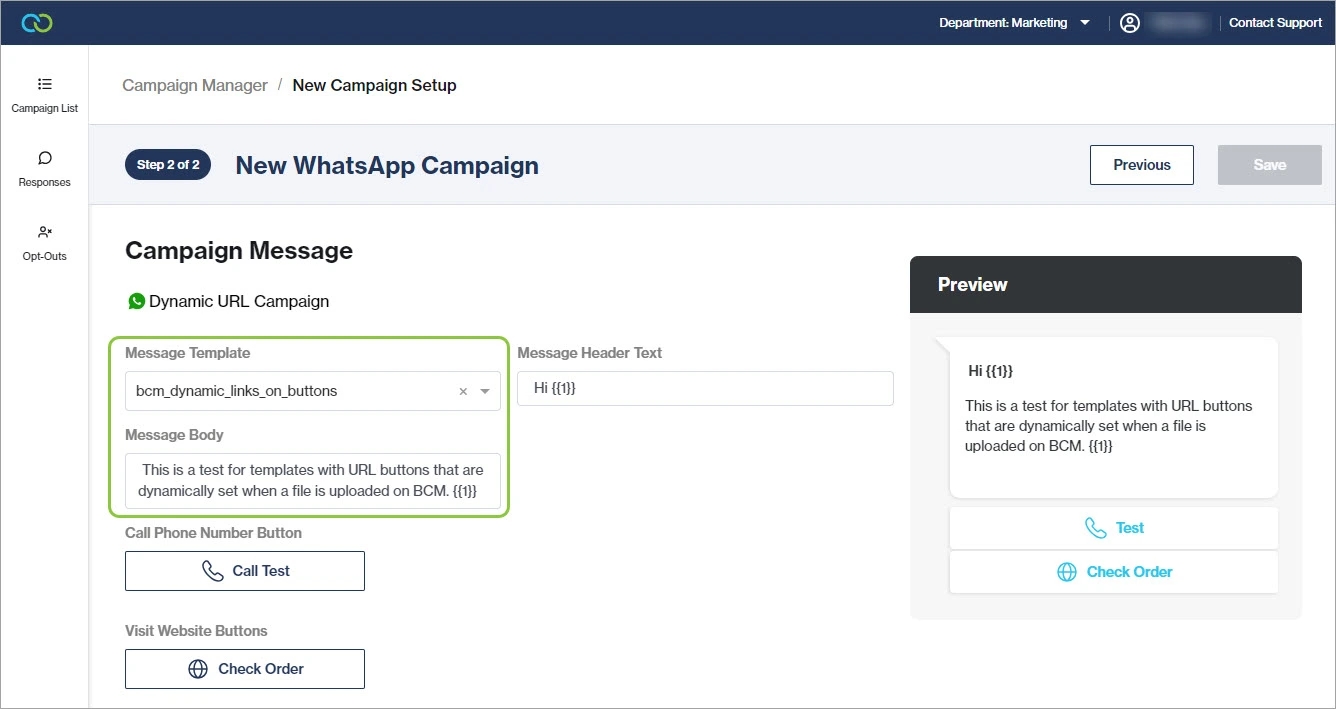
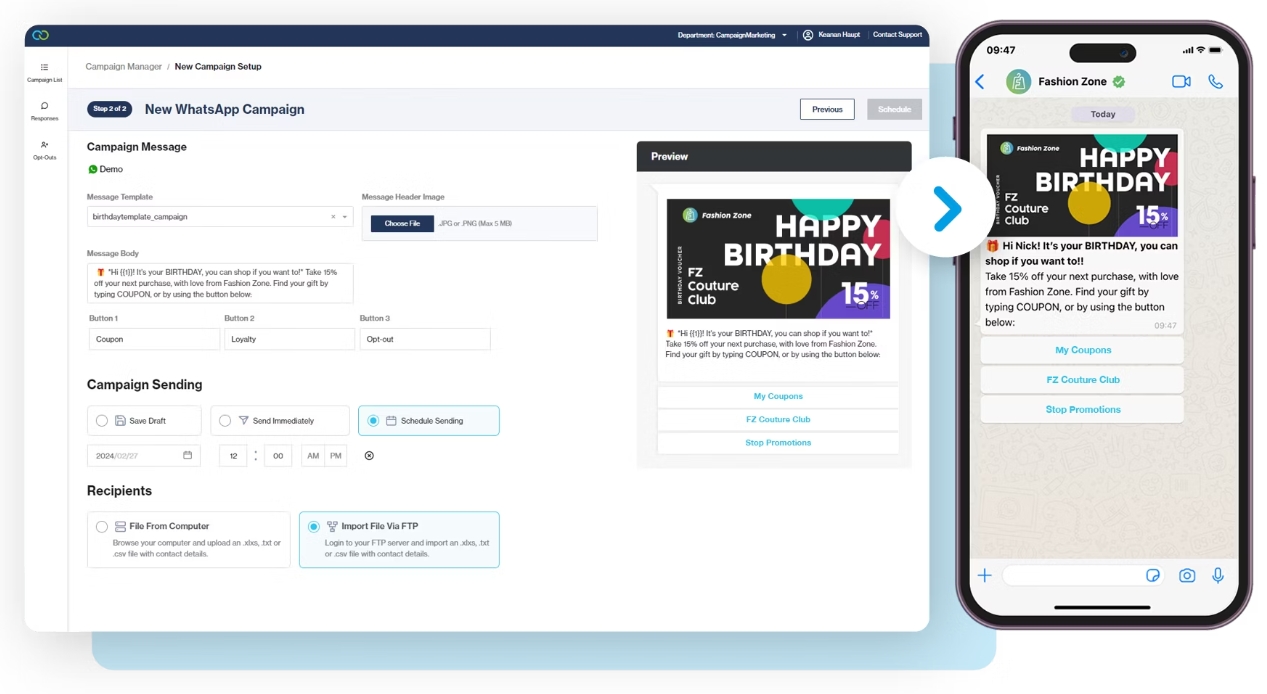
When creating a new campaign in Campaign Manager, you can select a message template that contains dynamic URLs from the message template drop-down list. A preview of the message is shown on the right.

You can now select a WhatsApp message template that contains dynamic URLs.
After uploading the recipient file containing the dynamic URL data, you map each variable in the template to a column in the file, including the dynamic URL variable. Once saved, you can preview the fields that will populate each variable in the template.

UI Updates

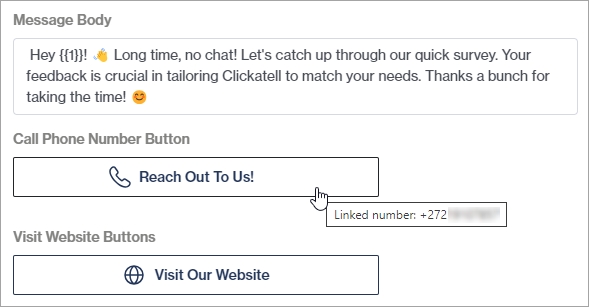
All buttons in the template are also now listed. If it is a call-to-action button, the number and URL(s) linked to each button are shown when hovering over it. This number will be dialed if an end-user taps the Call Phone Number button and the URL launched when they tap the Visit Website button.

The number linked to this button for the selected template is shown upon hover.
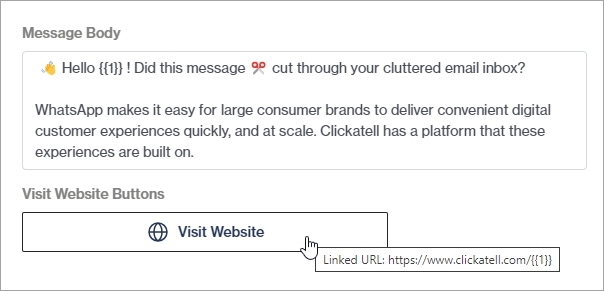
If the URL button is linked to a dynamic URL, it is shown in the format: https://example.com/order/\\{{1\\}}. The value of this variable gets mapped when uploading the recipient file.

The dynamic URL linked to this button for the selected template is shown upon hover.
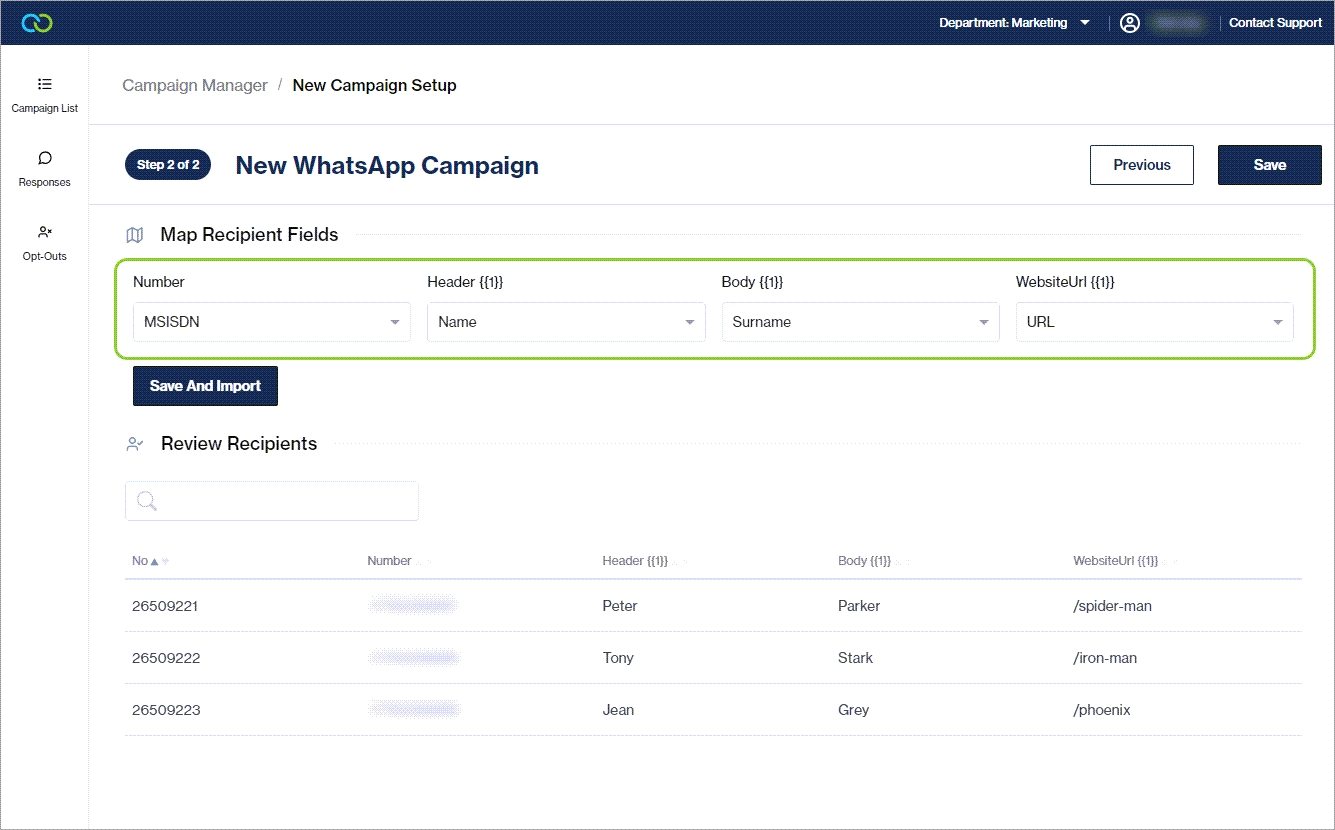
We also updated the field names of the variables to make it easier to know what to map where.

The field names of the variables were updated to be more descriptive.
Bugs 🐞

We fixed an important bug that prevented users from deleting a Pending (scheduled) campaign.

NEW: WhatsApp Campaign Manager

The WhatsApp Campaign Manager application lets you create, send, and manage custom WhatsApp campaigns with no coding or developer support required. This tool is ideal for sending out marketing campaigns and newsletters at scale from a simple web interface. With just a few clicks, you can broadcast promotional messages, exclusive content, discount codes, event invitations, or customer satisfaction surveys directly to their customers' preferred communication channel, while tracking the progress and performance of campaigns and managing replies and opt-outs.

Using the reach, familiarity, richness, and personalization capabilities of the WhatsApp channel to market to customers opens a multitude of opportunities to simplify your marketing efforts while simultaneously amplifying its impact.

The WhatsApp Campaign Manager forms part of the Connect package. Note that to route customer responses to Chat Flow or Chat Desk, an Interact or Transact package is required.

Read our detailed user guide for information about using this application.

Other Enhancements & Improvements

SMS: Daily Sandbox testing limits reduced on MC2

  • The number of daily and monthly free SMS messages available for Sandbox testing on MC2 has been reduced.

  • The number of free SMS messages per account is now limited to 10 (ten) per day with an overall maximum of 100 (one hundred) per month.

  • Note that WhatsApp Sandbox testing limits remain unchanged at 100 (one hundred) per day with an overall maximum of 1000 (one thousand) per month.

Support for WhatsApp buttons & template enhancements

Release date: 14 March 2024

Buttons are optional interactive components that can be added to WhatsApp message templates. There are two types of buttons, Call-To-Action and Quick Reply, that perform specific actions when tapped by an end-user.

Meta has introduced support for additional button types, combinations, and limits on WhatsApp message templates, enhancing the existing buttons and lists we are already familiar with. Building on a previous WhatsApp release, Chat Flow now also supports multiple buttons and the Coupon Code and Catalog templates in WhatsApp.

WhatsApp Button Enhancements

More buttons and combinations allowed

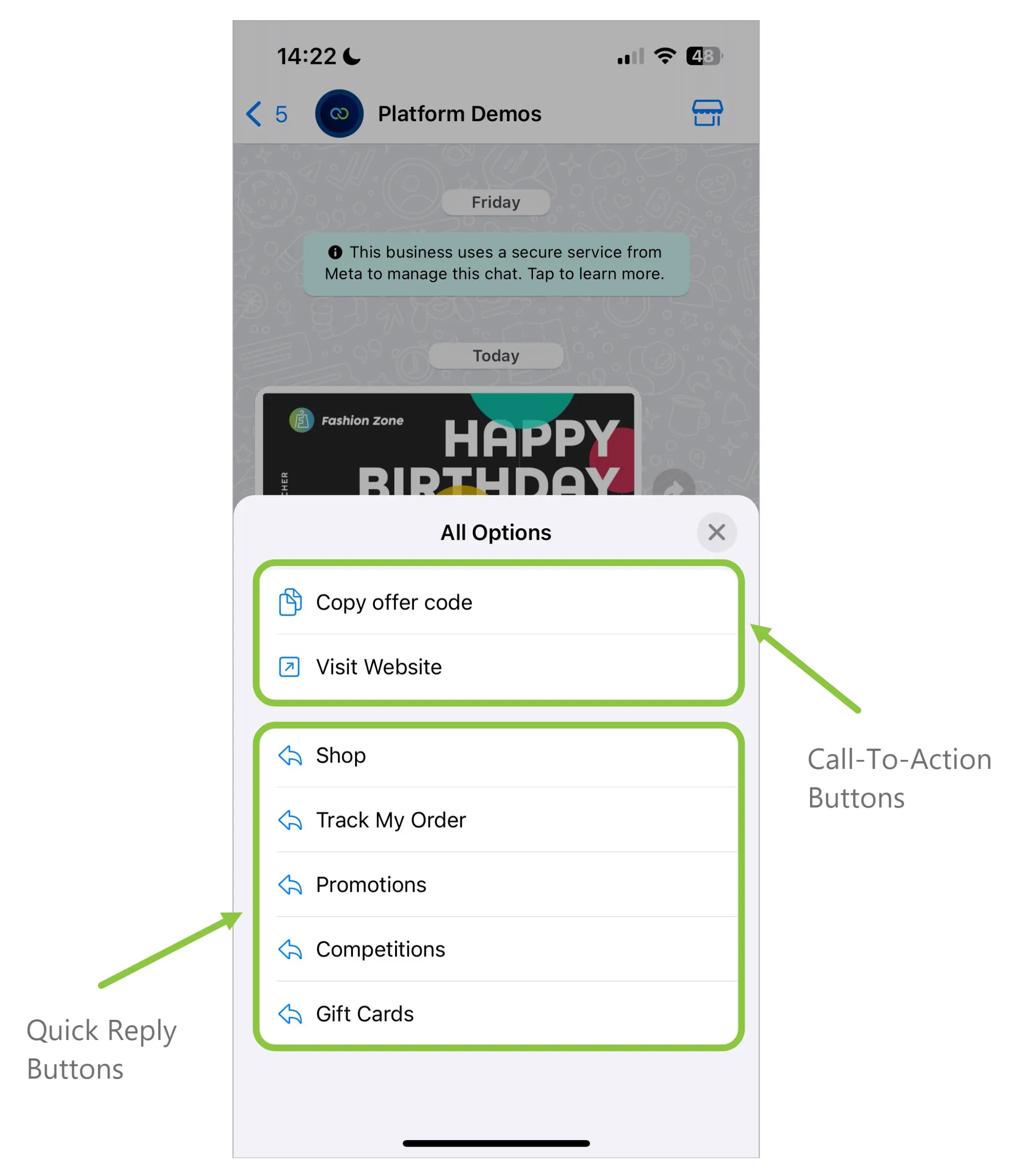
Previously, there was a limit of three buttons per template and you could only add buttons of one type - either Call-To-Action buttons or Quick Reply buttons. With this release, a template can now contain up to 10 buttons in total, and the buttons can be a combination of Call-to-Action and Quick Reply buttons.

When using a combination of buttons, the types must be grouped, i.e., all Call-To-Action buttons must be grouped together and all Quick Reply buttons must be grouped together. Note that further limits may apply to individual button types.

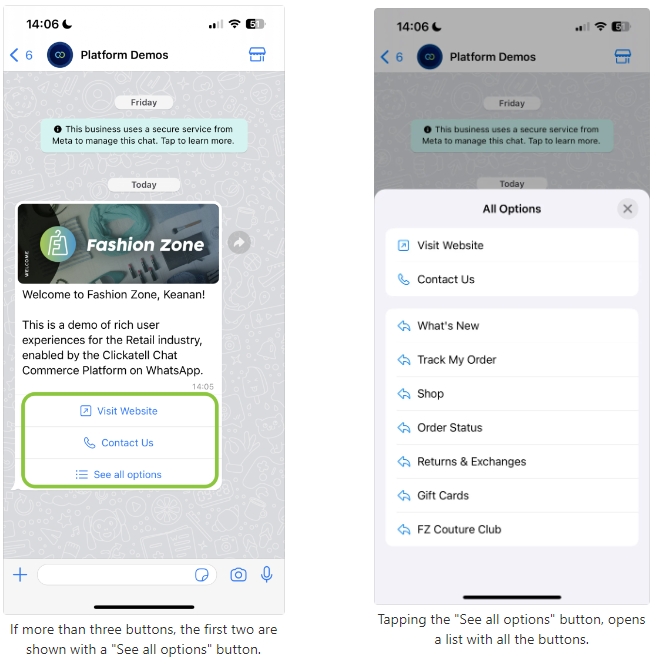
If a message template contains more than three buttons, the first two buttons appear in the delivered message, and the remaining buttons are shown when the end-user taps See all options (see screenshots below).

Quick Reply Buttons

Quick Reply buttons are custom text-only buttons that immediately message the business with the specified text when tapped by the customer.

Message templates are limited to 10 quick reply buttons. If using quick reply buttons with other buttons, buttons must be organized into two groups: quick reply buttons and non-quick reply buttons. If grouped incorrectly, the API will return an error indicating an invalid combination.

Call-To-Action Buttons

This allows a user to call a phone number, visit a website, or copy an offer code (new - see below) with the tap of a button.

Visit website buttons open the specified URL in the device's default browser when tapped. Templates are limited to two URL buttons.

Call phone number buttons call the specified business phone number when tapped. Templates are limited to one phone number button.

A combination of Quick Reply and Call-To-Action buttons, grouped together.
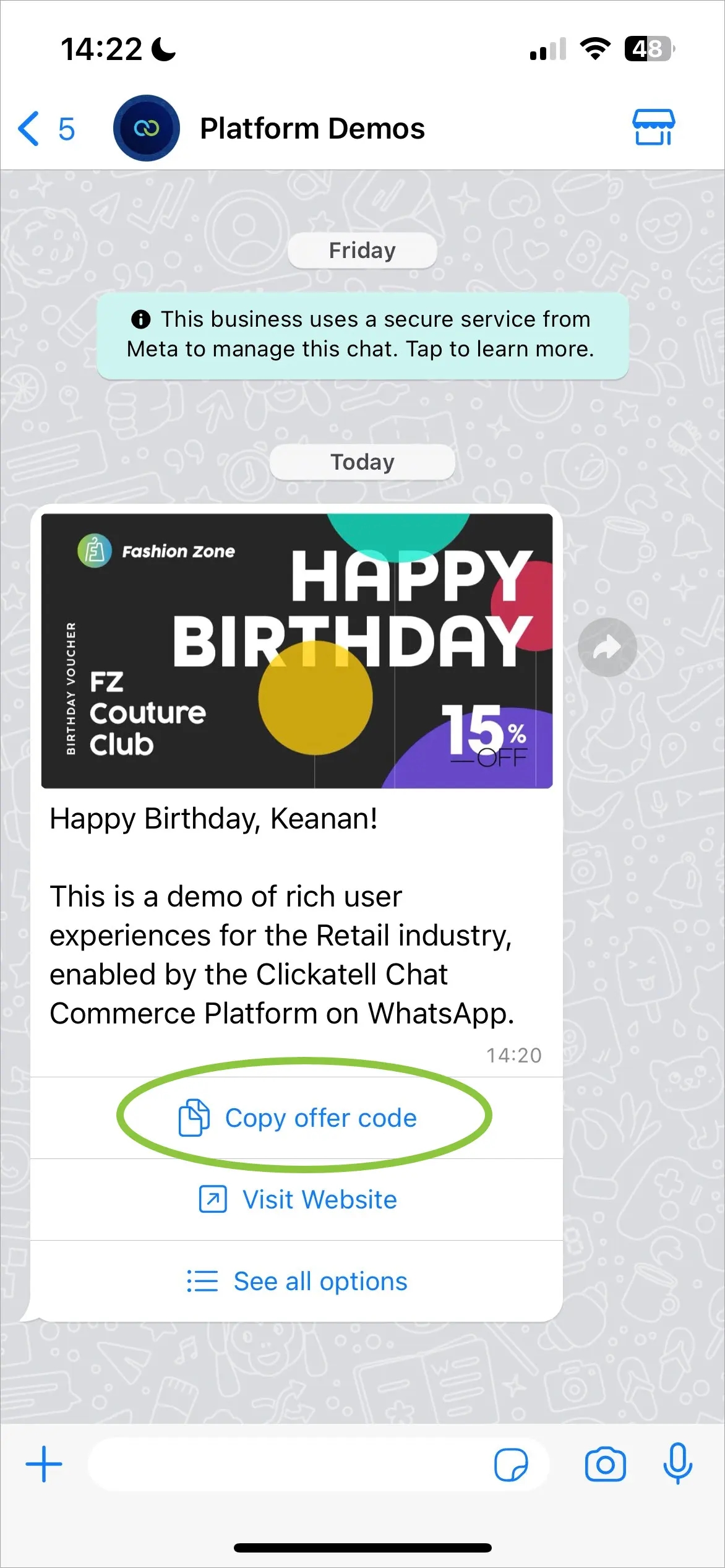
NEW: Coupon Code Templates

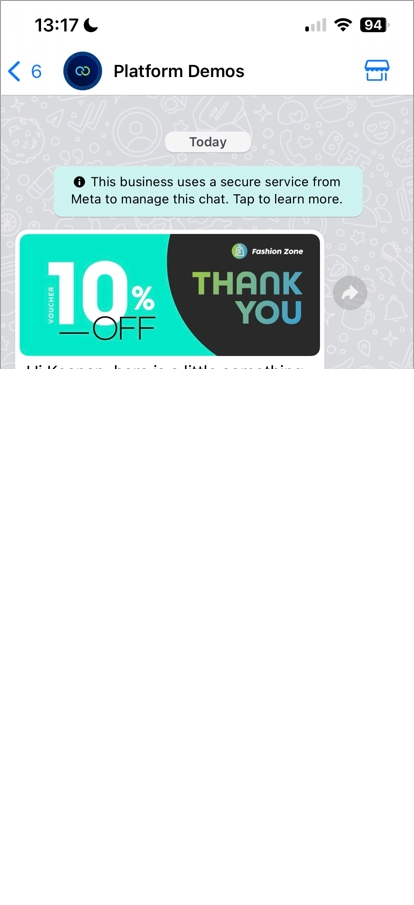
Coupon code templates are marketing templates that display a single Copy offer code button. This new type of Call-To-Action button copies a text string to the device's clipboard when tapped by the customer. This text string is defined when the template message is sent. Templates are limited to one Copy offer code button, and the button text is not editable.

When an end-user taps the "Copy offer code" button, it copies the specified text string to the device's clipboard.
Session timeout event (Phase 1)

Release date: 14 March 2024

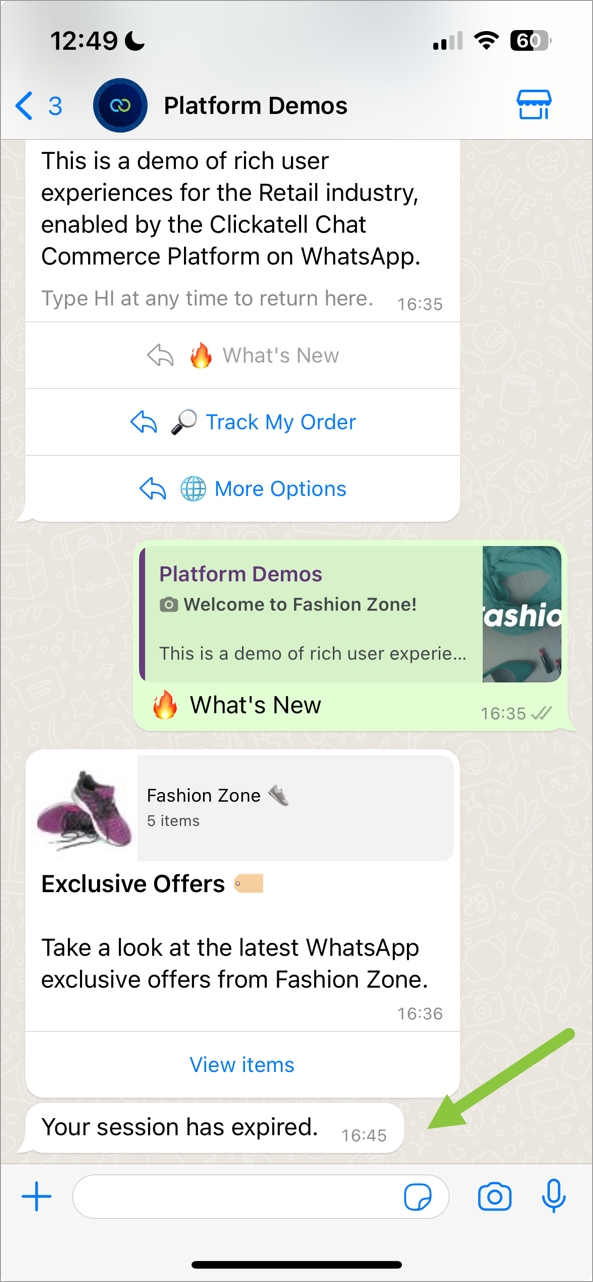
With our new Session Timeout Event feature in Chat Flow, you can inform your customers that their session is about to expire, resulting in a better user experience by keeping customers informed.

For example: If your Chat Flow application is set to time out after 10 minutes, a final “goodbye” message is automatically sent to your customers 60 seconds before the session expires (the timing is configurable). A pre-built, customizable “goodbye” flow is available in Chat Flow, allowing you to use your own custom messages and align the flow to your brand and chosen user experience.

With this first release, our internal team will activate this feature on your profile and help you set up when the final message should be triggered.

In a follow-up release, we will introduce self-service capabilities that will allow flow-builders to activate this feature themselves and give them the ability to adjust the timeout flow and timing.

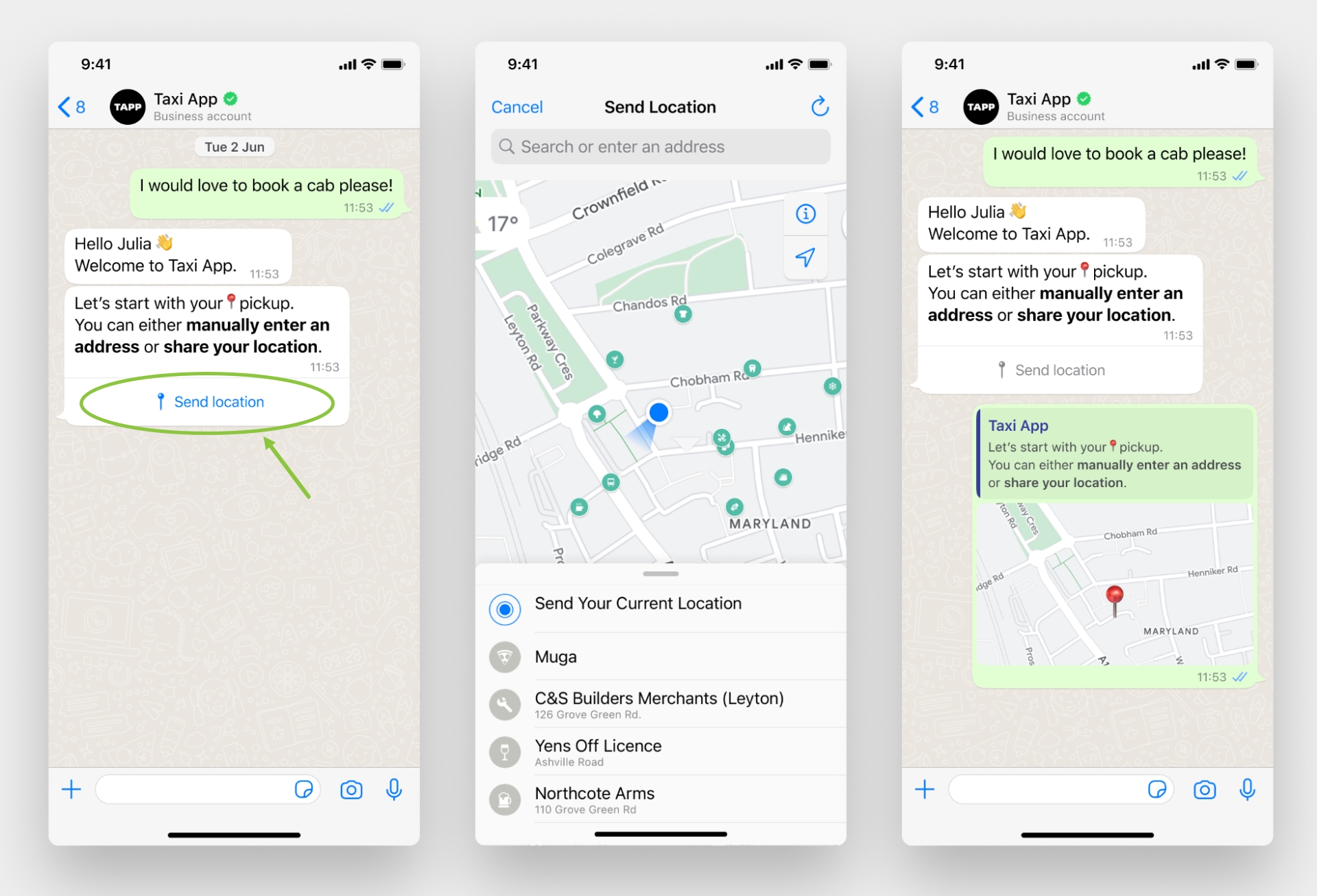
Location request interactive message as seen by customers in WhatsApp
Note that the "Send Location" button text cannot be edited. Real-time (live) locations are not supported.

With this release, we updated the Location Sharing node to allow a business to request a location from a customer and give the customer an easy, structured way to share their location. Tapping the Send location button displays a location-sharing screen that the customer can use to share their location with the business.

Location request interactive message

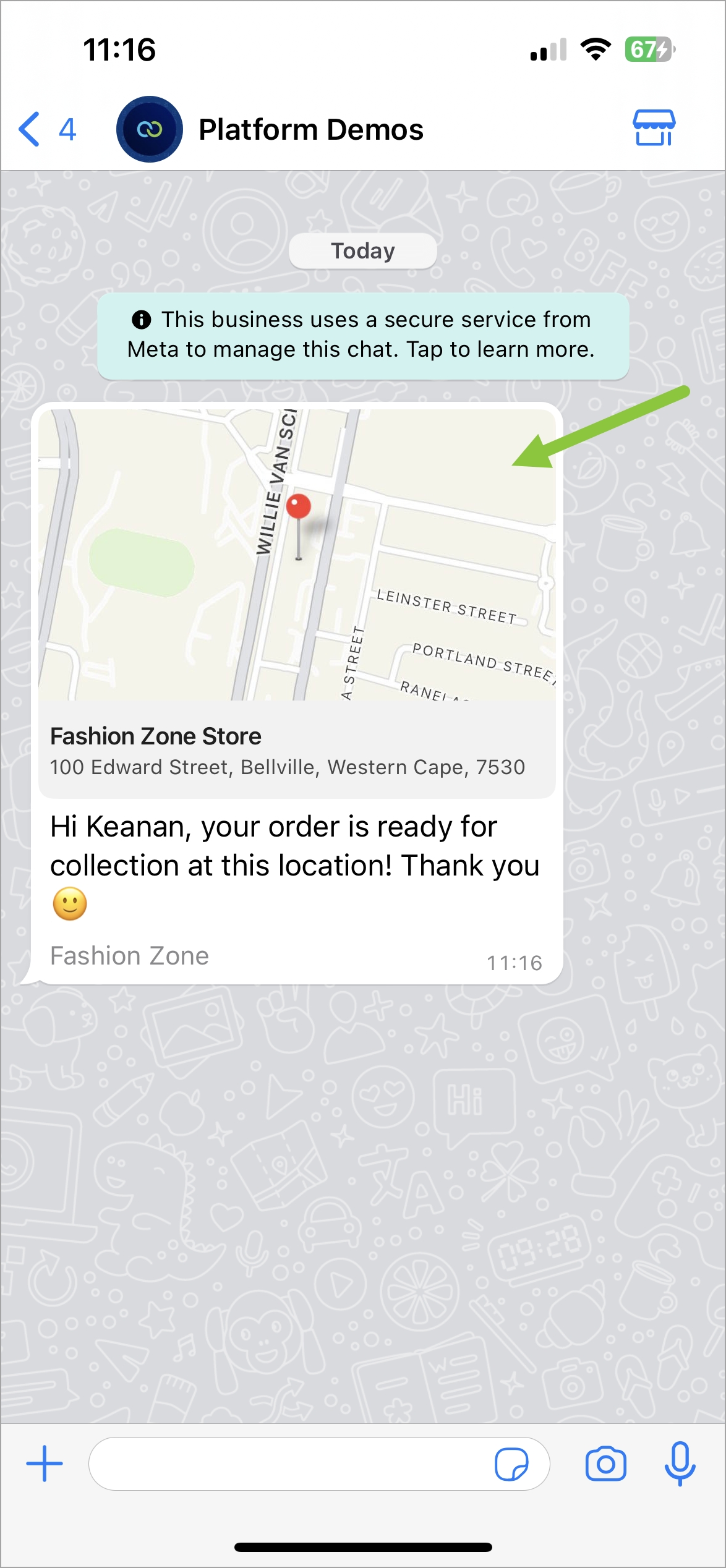
Location Template: Customer's experience on WhatsApp
Note that location headers can only be used in Utility and Marketing templates, and on the Cloud environment. Real-time (live) locations are not supported.

The location message template lets businesses share a specific location with their customers by including the location in the header of a message template. When tapped, the user's default map app will open and load the specified location.

The location template is now supported on the Send Template node in Chat Flow and can be sent as part of workflows. This is especially useful for order tracking, delivery updates, ride-hailing pickup/dropoff, locating physical stores, etc.

Location template

We'll describe some of the highlights of this release in more detail below.

We also addressed some bugs, continually enhancing our applications and making our customers' experience smoother.

This enables businesses to easily share a location with their customers via WhatsApp as part of a workflow. Businesses can also request customers to send their location with the tap of a button.

This release focused on adding support for the following WhatsApp features in Chat Flow:

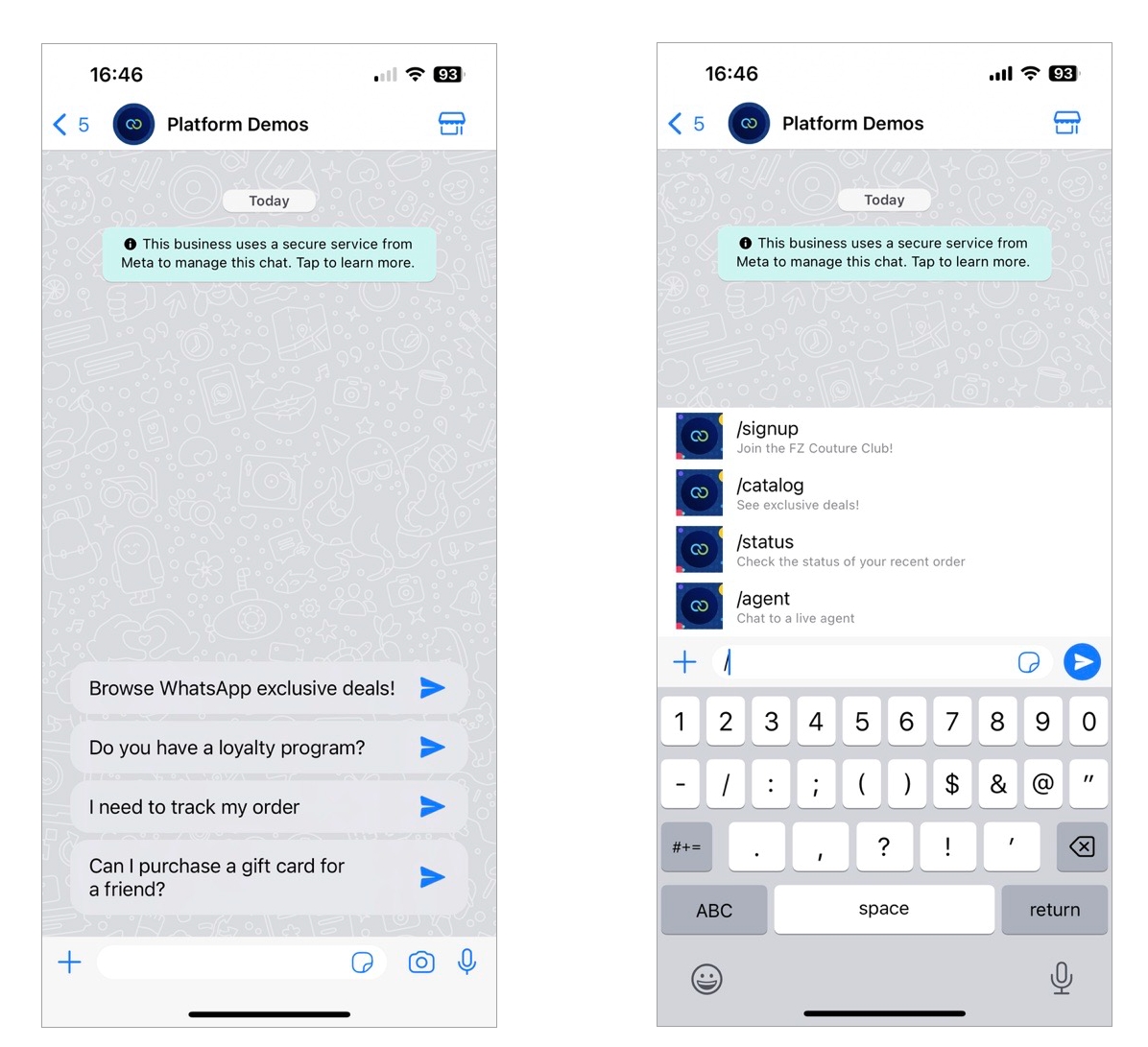
WhatsApp conversational components: Icebreakers and Commands

Release date: 8 March 2024

WhatsApp conversational components are special in-chat features that make it easier for customers to interact with your business on WhatsApp. These components can be set up and personalized per WhatsApp Business number, making user interactions more interesting and engaging. It provides users with choices during the chat, adding to the usual interactions with bots or agents.

Clickatell currently supports the following conversational components:

Examples of Icebreakers (left) and Commands (right) as seen by customers in WhatsApp.

Support for location templates and location request messages

Release date: 15 February 2024

This release focused on adding support for the following WhatsApp features in Chat Flow:

This enables businesses to easily share a location with their customers via WhatsApp as part of a workflow. Businesses can also request customers to send their location with the tap of a button.

We also addressed some bugs, continually enhancing our applications and making our customers' experience smoother.

We'll describe some of the highlights of this release in more detail below.

Location template

The location template is now supported on the Send Template node in Chat Flow and can be sent as part of workflows. This is especially useful for order tracking, delivery updates, ride-hailing pickup/dropoff, locating physical stores, etc.

The location message template lets businesses share a specific location with their customers by including the location in the header of a message template. When tapped, the user's default map app will open and load the specified location.

Note that location headers can only be used in Utility and Marketing templates, and on the Cloud environment. Real-time (live) locations are not supported.

Location Template: Customer's experience on WhatsApp

Location request interactive message

With this release, we updated the Location Sharing node to allow a business to request a location from a customer and give the customer an easy, structured way to share their location. Tapping the Send location button displays a location-sharing screen that the customer can use to share their location with the business.

Note that the "Send Location" button text cannot be edited. Real-time (live) locations are not supported.

Location request interactive message as seen by customers in WhatsApp
Sending and requesting locations on WhatsApp

Release date: 15 February 2024

Location templates

When using a Media or Utility type template, you can now add location as a header. To your customer, this appears as a generic map at the top of the template reflecting a static location defined by the business for a particular use case. When tapped, the customer's default map app will open and load the specified location.

Request location interactive message

Clickatell now supports interactive messages requesting customers to share a location. They contain body text and a Send location button that customers can tap. Tapping the button displays a location-sharing screen that the user can then use to share their location.

Sharing of a live location is not supported.

WhatsApp buttons & template enhancements

Release date: 24 January 2024

Button enhancements

Previously, Clickatell only supported one type of interactive button per template, i.e., either call-to-action buttons or quick reply buttons, not both. You could also add only three buttons per template.

With this release, you can now add up to 10 interactive buttons per template, and buttons in one template can include a combination of call-to-action and quick reply buttons.

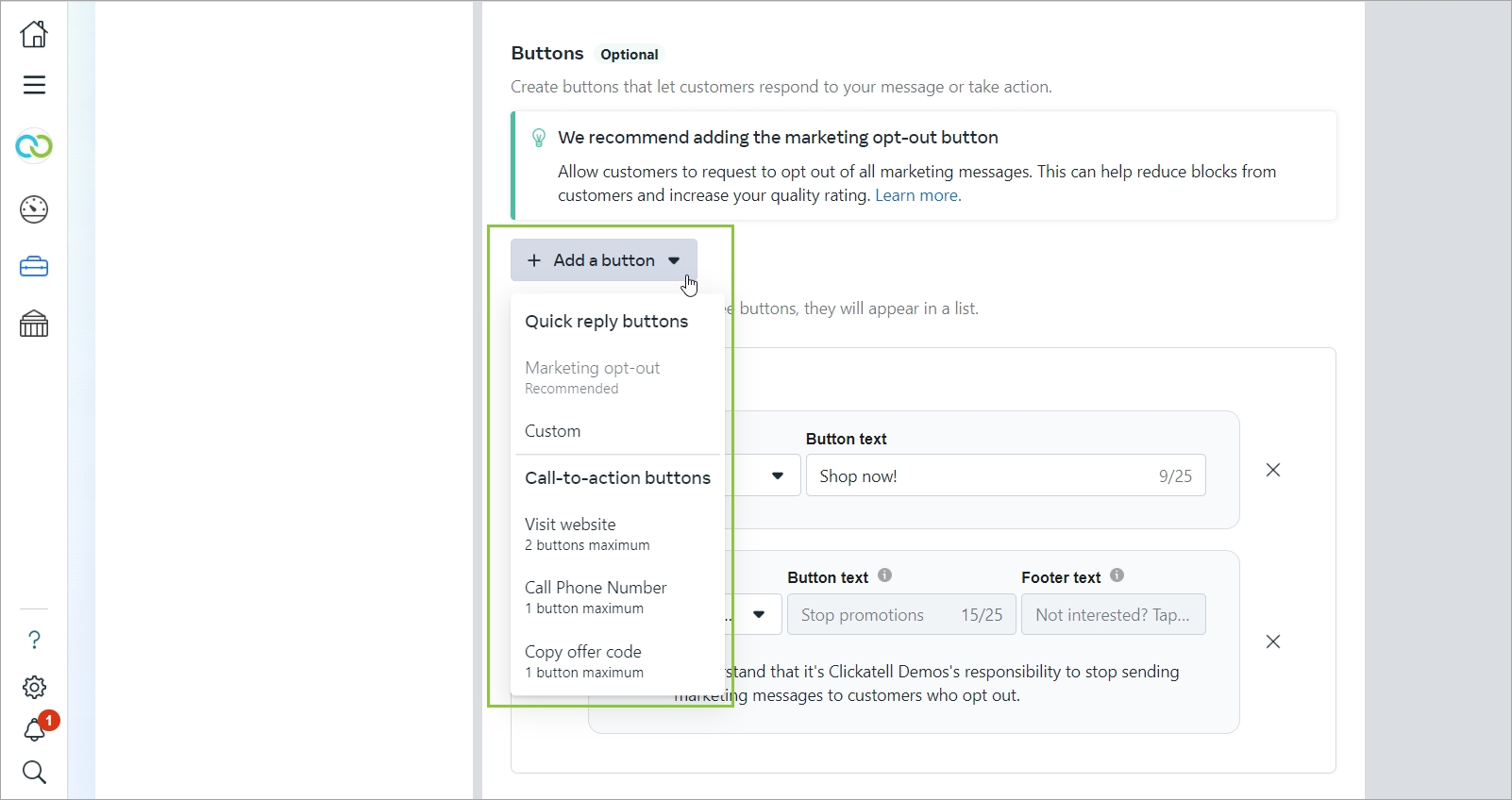
You can add quick reply and call-to-action buttons to your message template.
Coupon templates

You can now add a Copy offer code button to any of your message templates. When tapping this button, the code is copied to your customer's clipboard and they can paste it wherever they want.

Only available on the shared model and not on the on-behalf-of model.

Example of the copy code button on a customer's device.
Catalog templates

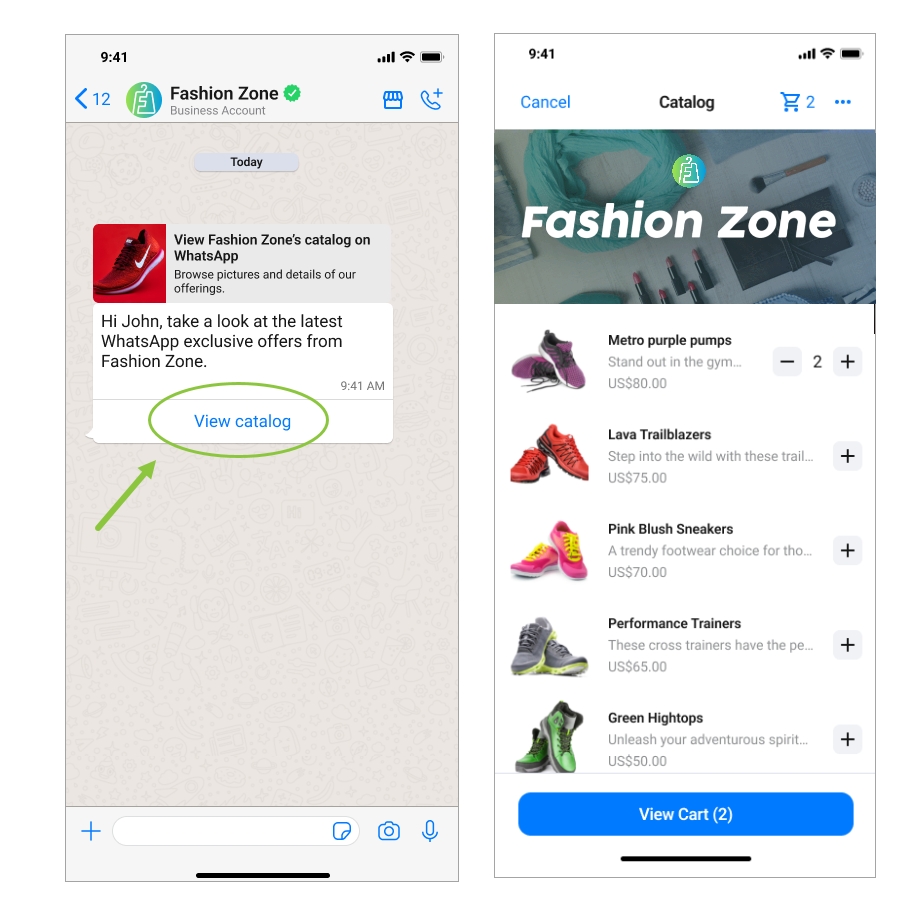
You can now present a product catalog to your customers within WhatsApp by making use of Product messages under the Marketing template category.

Catalog templates display a product thumbnail header image of your choice and custom body text. The text header, sub-header, and button text are non-editable.

When a customer taps the View catalog button in a catalog template message, your product catalog appears within WhatsApp.

Example of the catalog template as displayed on a customer's device.
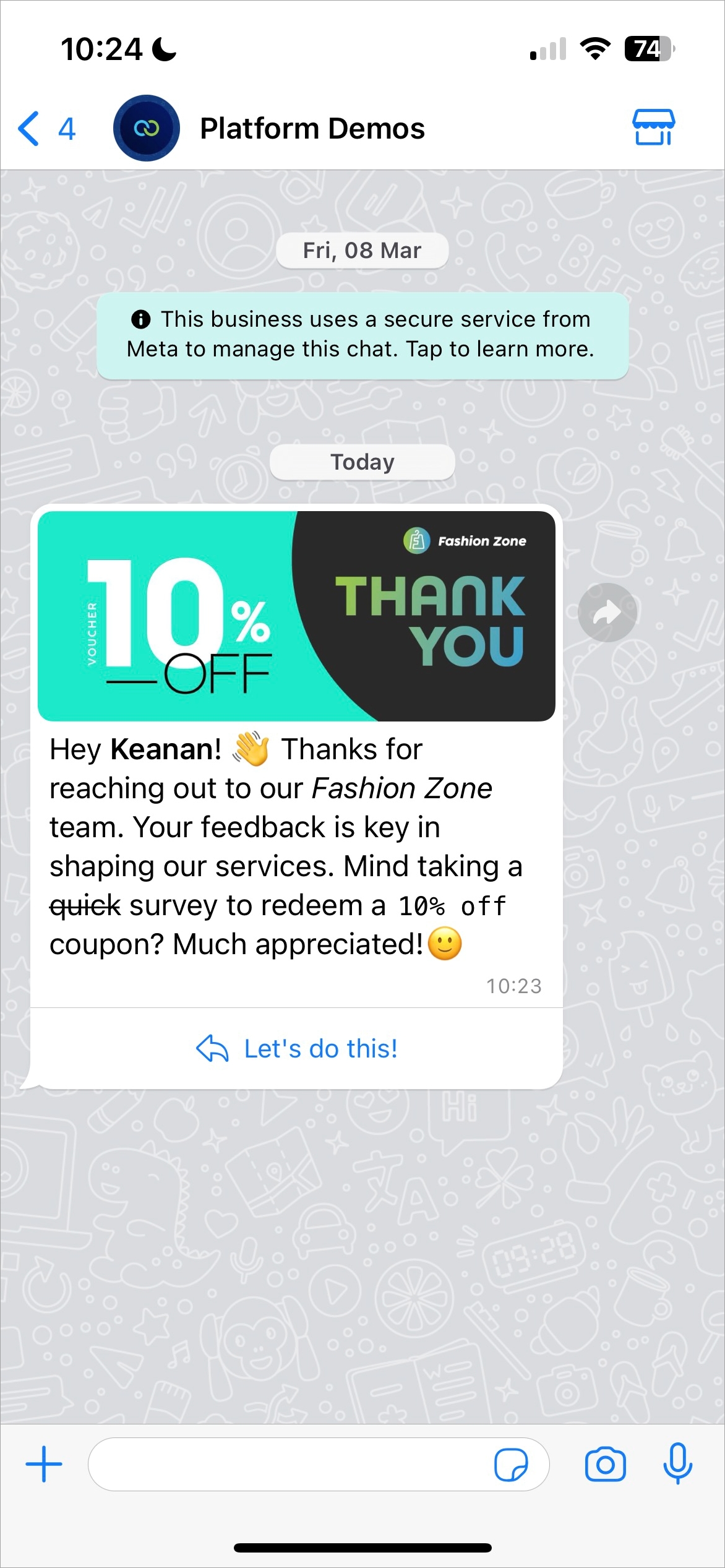
WhatsApp text formatting

Additional text formatting options are now available for WhatsApp messages. These can be used when sending regular messages or when creating templates.

The following additional format options have been added:

  • Numbered Lists

  • Bulleted Lists

  • Block Quote

  • Inline Code

These new formatting options, along with the already available emojis and format options (bold, italics, strikethrough, monospace), can be used to make messages easier to read and more visually appealing.

MC2 Platform:

  • WhatsApp templates not including footer (OBO WABAs).

  • Fixed the exporting of MC2 SMS stock report.

  • Credit limit variable added to the credit alert email's content.

Clickatell User Portal:

  • Simplified the WhatsApp subscriptions page since post-paid clients only have one subscription option, and do not have a choice between several different options.

  • Chat Desk/Chat Flow Provisioning: WA number not showing once WA channel is linked.

  • Remove "Link Channel" and "Link Another Channel" from the Chat Flow and Chat Desk landing pages.

Last updated