# Multi Product

{% hint style="info" %}
To use this node, you must be subscribed to Clickatell's [**Transact** ](https://guides.clickatell.com/clickatell/packages/transact)package. Contact our[ **Sales Team**](https://www.clickatell.com/contact/contact-sales/) for more information.

This feature is available on the **WhatsApp channel only**.
{% endhint %}

The *Multi Product* node is used to present items to customers from a catalogue you've set up in Facebook Business Manager. Customers can then add selected items to a cart and submit the order to your business.&#x20;

You can display up to a maximum of **30** products from your catalogue to the customer at a time *(a limitation enforced by Meta)*. You can use the *Multi-Product* node **multiple** times in a flow, as long as all the products they refer to are from the same catalogue.

## Linking a product catalogue to Chat Flow

1. [Set up your catalogue](https://www.facebook.com/business/help/1275400645914358?id=725943027795860) in the Facebook Business Manager Commerce Platform and upload the inventory to the catalogue.
2. Add a *Multi Product* node to your workflow at the desired place.
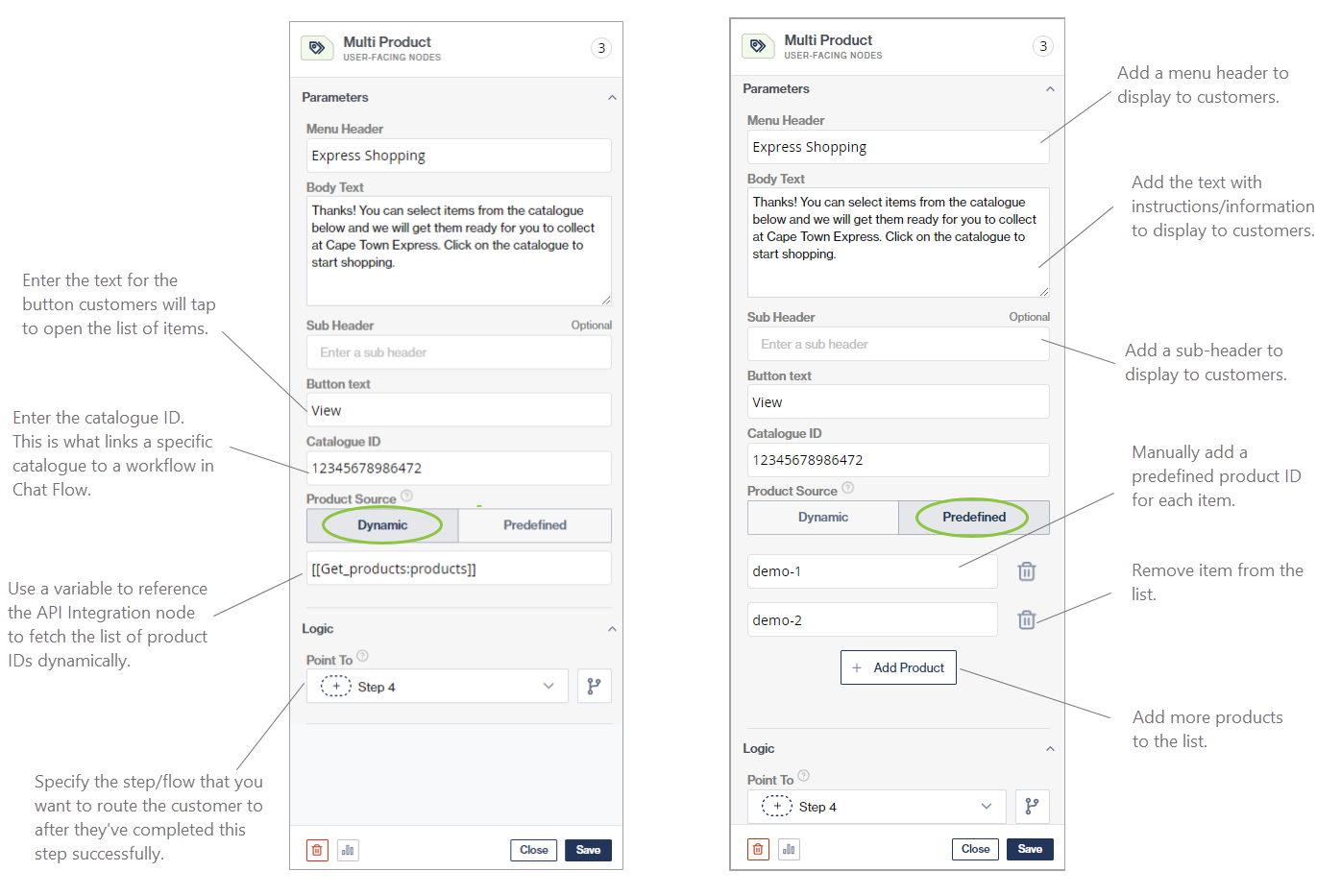
3. Add the *Catalogue ID* to the node.&#x20;
   * This ID is created when you add the catalogue to Facebook Business Manager.
4. Add *Product IDs* to reference the specific products from the catalogue. This can be added in two different ways:
   * **Dynamic:** The flow-builder can use an API call to fetch the product IDs from your management system before using the *Multi-Product* node and use these IDs as variables in Chat Flow
   * **Predefined:** The flow-builder can manually add the product IDs to the node (i.e., "hard-coded").

<figure><img src="/files/6Fwbq1TSFfuKqJdNtG9D" alt=""><figcaption><p>Setup of a Multi Product node. Product IDs can be dynamically requested from your management system via an API call (left), or predefined product IDs can be added manually by the flow-builder (right).</p></figcaption></figure>

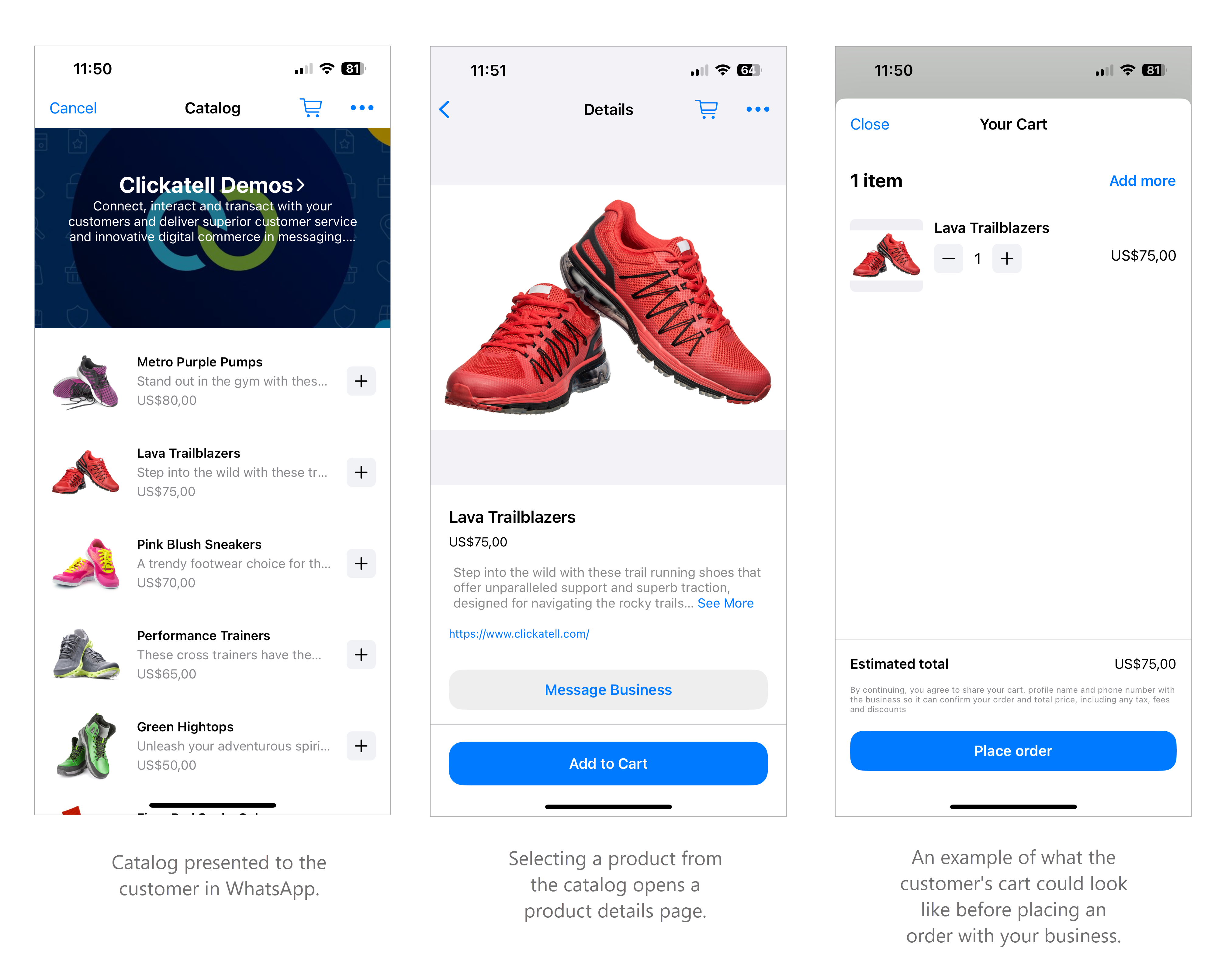
The images below indicate how a catalogue is presented to the end-user in WhatsApp.

<figure><img src="/files/spViLCFrhurXDoLwwr8m" alt=""><figcaption></figcaption></figure>


---

# Agent Instructions: Querying This Documentation

If you need additional information that is not directly available in this page, you can query the documentation dynamically by asking a question.

Perform an HTTP GET request on the current page URL with the `ask` query parameter:

```
GET https://help.clickatell.com/chat-flow/user-facing-nodes/commerce/multiple-product.md?ask=<question>
```

The question should be specific, self-contained, and written in natural language.
The response will contain a direct answer to the question and relevant excerpts and sources from the documentation.

Use this mechanism when the answer is not explicitly present in the current page, you need clarification or additional context, or you want to retrieve related documentation sections.